
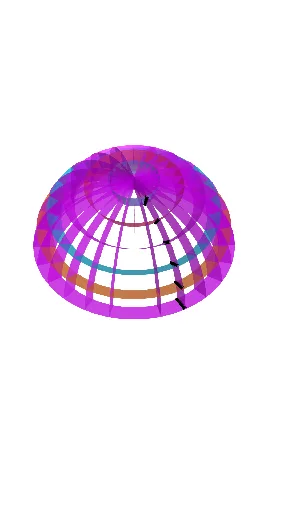
Constructing a 15° Half-Sphere Surface
Loading the math board and drawing, please wait…
This example demonstrates how to build a half-sphere style solid/surface in 3D and control the geometry using a specified 15° angle, allowing you to visualize how a spherical surface is cut or segmented and then completed into a symmetric shape. Key mathematical ideas include solid geometry of spheres and hemispheres, angle-based construction (15 degrees), parametric-style surface generation (constructing surfaces from geometric primitives), and the connection to calculus/integral concepts in a broader teaching context (e.g., spherical area/volume can be discussed as extensions). The construction emphasizes standard GeoGebra commands and workflow: Point, Segment, Line, and Intersect are used to define reference points, segments, lines, and their intersection locations; Rotate is then applied to sweep/rotate the profile around an axis to produce the sphere-related geometry; Surface is used to create the actual curved surface from the computed boundary/guide elements; Mirror is used to enforce symmetry and complete the half-sphere configuration. The model contains many named point objects (e.g., A, B, C, D and their transformed variants) along with intermediate curve/surface entities generated throughout the sequence. Suitable for high-school advanced geometry exploration, STEM modeling practice, and introductory undergraduate learners wanting an intuitive understanding of sphere construction and surface generation.
GeoGebra Commands & Parameters
Point(xAxis) → APoint(xAxis) → BSegment(A, B) → fIntersect(zAxis, xAxis) → CPoint(zAxis) → DLine(C, D) → gPoint(yAxis) → ELine(C, E) → hRotate(A, (-(15°)), h) → A'Rotate(B, (-(15°)), h) → B'Segment(A', B') → f'Surface(f', 350.66339780238053°, xAxis) → aSurface(f, 360°, zAxis) → bSurface(f', 360°, zAxis) → cRotate(A', 15°, h) → A''Rotate(B', 15°, h) → B''Rotate(A, (-(30°)), h) → A'_1Rotate(B, (-(30°)), h) → B'_1Segment(A'_1, B'_1) → f'_1Surface(f'_1, 360°, zAxis) → dRotate(A, (-(45°)), h) → A'_2Rotate(B, (-(45°)), h) → B'_2Segment(A'_2, B'_2) → f'_2Surface(f'_2, 360°, zAxis) → eRotate(A, (-(60°)), h) → A'_3Rotate(B, (-(60°)), h) → B'_3Segment(A'_3, B'_3) → f'_3Surface(f'_3, 360°, zAxis) → iRotate(A, (-(75°)), h) → A'_4Rotate(B, (-(75°)), h) → B'_4Segment(A'_4, B'_4) → f'_4Surface(f'_4, 360°, zAxis) → jSurface(f, 180*°, yAxis) → kMirror(k, xOyPlane) → k'Rotate(k', 15°, g) → k''Rotate(k', 30°, g) → k''_1Rotate(k', 45°, g) → k''_2Rotate(k', 60°, g) → k''_3Rotate(k', 75°, g) → k''_4Rotate(k', 90°, g) → k''_5Rotate(k', (-(15°)), g) → k''_6Rotate(k', (-(30°)), g) → k''_7Rotate(k', (-(45°)), g) → k''_8Rotate(k', (-(60°)), g) → k''_9Rotate(k', (-(75°)), g) → k''_{10}
AI Drawing Prompt Reference
Draw a half-sphere with a 15° cut angle. Start by creating points A and B on the x-axis, then create line g through the intersection of the z-axis and x-axis C, and point D on the z-axis. Create line h through point E on the y-axis and point C. Rotate points A and B around line h by -15° to get A' and B', then create arc f' from A' to B' and generate the half-sphere a with a 15° cut angle. Next, rotate points A and B around h by 15°, 30°, 45°, 60°, and 75° to create arcs f'_1 to f'_4 and generate corresponding half-spheres d to i. Then create a half-sphere k around the y-axis and mirror it to generate k', then rotate k' around line g to generate k'' to k''_{10}, completing the 15° cut angle half-sphere construction.
The prompt above was compiled from the original drawing commands and is for reference only.