
Intermediate Value Theorem Dynamic Illustrator
Loading the math board and drawing, please wait…
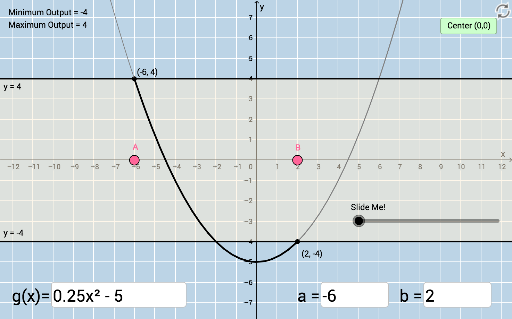
This example dynamically illustrates the Intermediate Value Theorem, focusing on the properties of continuous functions. By adjusting the interval endpoints, one can observe the function's value within the interval. The construction summary mentions the use of commands like TextField, Min, Max, Dilate, Segment, Intersect, and Root. Suitable for high school math education to help students understand the core concepts of the Intermediate Value Theorem.
GeoGebra Commands & Parameters
Textfield(f) → InputBox1Textfield(a) → InputBox2Textfield(b) → InputBox3Min({f(a), f(b)}) → minMax({f(a), f(b)}) → maxDilate(I, If[0 < d ≤ 1, 1 - d, 0], H) → I'Segment(I, I') → f_1Intersect(j, xAxis) → KRoot(p_1, x(A), x(B)) → CIntersect(f, t) → JDilate(E, If[1 < d ≤ 2, 2 - d, 0], J) → E'_1Segment(E, E'_1) → g_1Dilate(J, If[2 < d ≤ 3, 3 - d, 0], C) → J'Segment(J, J') → rTextfield(c) → InputBox4