
Interior Angle Bisector Construction
Loading the math board and drawing, please wait…
In collections
SOME SPECIAL POINTS IN TRIANGLE
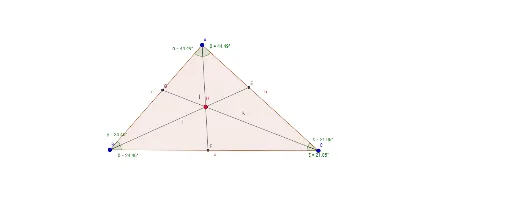
This example demonstrates the construction of an interior angle bisector in a triangle using GeoGebra, highlighting key mathematical concepts such as angles, line segments, polygon creation, vector operations, and trigonometry. The construction process involves commands like Polygon, AngularBisector, Intersect, Segment, and Angle, making it suitable for high school geometry education and understanding the properties of angle bisectors in triangles.
GeoGebra Commands & Parameters
Polygon(A, B, C) → çokgen1, c, a, bAngularBisector(A, B, C) → fAngularBisector(A, C, B) → gAngularBisector(B, A, C) → hIntersect(f, g) → DIntersect(f, b) → ESegment(B, E) → iIntersect(h, a) → FSegment(A, F) → jIntersect(g, c) → GSegment(C, G) → kAngle(B, A, F) → αAngle(D, A, E) → βAngle(D, B, G) → γAngle(F, B, D) → δAngle(E, C, D) → εAngle(D, C, F) → ζ
AI Drawing Prompt Reference
Construct the interior angle bisectors of a triangle, marking the intersection points. Draw segments from these points to the triangle's vertices, forming three smaller triangles. Label the interior angles of each smaller triangle to illustrate the properties of angle bisectors.
The prompt above was compiled from the original drawing commands and is for reference only.