
Intercept Form Visualized with Geometric Construction
Loading the math board and drawing, please wait…
In collections
COORDINATE GEOMETRY
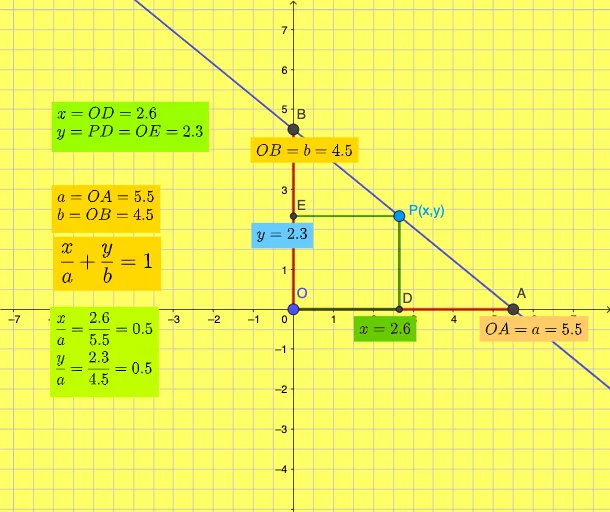
This GeoGebra example visualizes how an intercept form (intercept form) connects geometric features on the coordinate plane—particularly the positions of intercepts/roots—to the graph behavior of a quadratic equation. It centers on key concepts such as intercepts of quadratic functions, identifying x- and y-intercept information from geometric construction, and using perpendicular lines and intersection points to determine the parameters implied by the form. The construction is built with GeoGebra commands Segment and Point to create the geometric scaffolding, OrthogonalLine to draw perpendicular helper lines from reference objects, and Intersect to compute critical intersection points whose coordinates (e.g., x_{1}, y_{1}) represent the needed quantities. Named objects and equations (e.g., eq1, eq2, functions f and g, and text labels) are used to link the algebraic intercept form constraints with the displayed geometry. Suitable for secondary school instruction on functions and equations, and for learners exploring the relationship between analytic expressions and geometric interpretation.
GeoGebra Commands & Parameters
Segment(O, A) → fSegment(O, B) → gPoint(eq1) → COrthogonalLine(C, xAxis) → hIntersect(h, xAxis) → DOrthogonalLine(C, yAxis) → iIntersect(i, yAxis) → ESegment(C, D) → jSegment(C, E) → kSegment(O, D) → l
AI Drawing Prompt Reference
Visualize a quadratic function's intercept form by constructing geometric features on a coordinate plane. Start by drawing the x and y axes with a point at the origin. Create line segments from the origin to the axes, and find their intersections with the axes. Then, draw perpendicular lines from these intersection points to the axes, locating the feet of the perpendiculars. Finally, connect the intersection points to the feet of the perpendiculars to form geometric aids that illustrate the connection between the intercept form and the function's graph.
The prompt above was compiled from the original drawing commands and is for reference only.