
Interactive Visualization of Multiplying Mixed Numbers and Fractions
Loading the math board and drawing, please wait…
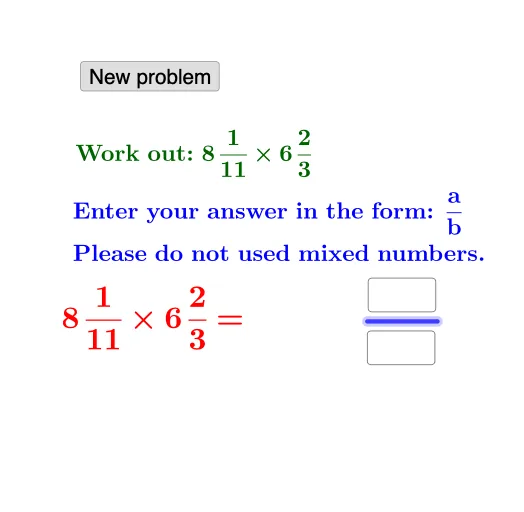
This example visually demonstrates how to multiply mixed numbers by using interactive, dynamically generated fraction components. Learners can see the workflow from representing a mixed number in fractional form to applying the multiplication rule and checking the resulting product. Key concepts include fractions and mixed numbers, conversion to improper fractions (equivalent representations), and the fraction multiplication principle (multiply numerators and denominators). The construction uses GeoGebra commands such as Random to generate values, Textfield to capture editable inputs for Numerator and Denominator, Segment to structure the workspace, If to choose or switch logic for different cases, and FractionText to display fractions and the final result as readable fraction text. The setup includes multiple numeric variables (e.g., a, e, f, d, t, b, c), input panels like InputBox1/InputBox2, and several text objects (text1–text7) plus a button (button1) to trigger or control the interaction. Suitable for middle school math instruction, fraction arithmetic practice, and interactive algebra learning.
GeoGebra Commands & Parameters
Random(1, 10) → aRandom(1, 10) → eRandom(e + 1, 12) → fRandom(1, 10) → dRandom(1, 10) → bRandom(b + 1, 12) → cRandom(1, 10) → gRandom(1, 10) → hRandom(h + 1, 12) → iTextfield(k) → InputBox1Numerator(j) → lDenominator(j) → mSegment(A, B) → pTextfield(o) → InputBox2If(l ≟ k ∧ m ≟ o, "Correct!", "Wrong. Try again.") → text2FractionText(q) → text6FractionText(r) → text7
AI Drawing Prompt Reference
Please draw an interactive visualization showing how to multiply mixed numbers by converting them to improper fractions. The graphic should include an input panel for entering numerator and denominator, a display area for the mixed number, a display area for the improper fraction, a result display area, and a prompt box to indicate correctness. The construction order should start with input, convert the mixed number to an improper fraction, apply the multiplication rule, and display the final result.
The prompt above was compiled from the original drawing commands and is for reference only.