
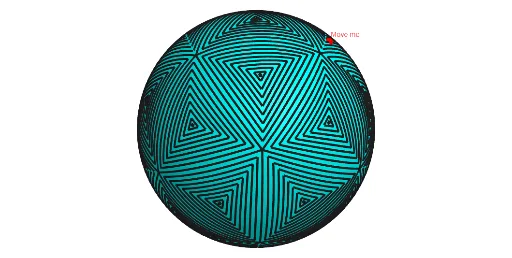
Interactive tessellation on sphere
Loading the math board and drawing, please wait…
This example demonstrates how to tessellate a sphere, showing the concept of spherical tiling in geometry. The key mathematical concepts involved include solid geometry, spherical geometry, and spatial partitioning. Construction involves using GeoGebra commands such as Point, Icosahedron, Midpoint, Sphere, and objects like Density, A, B, C to parameterize the model. It is suitable for high school students or college undergraduates for practical exploration of spherical geometry and solid geometry.
GeoGebra Commands & Parameters
Point(Circle[Midpoint[A, B], (Distance[A, B] * sqrt(3) / 2), Segment[A, B]]) → CIcosahedron(A, B, C) → a, D, faceABC, faceACF, faceAFG, faceADG, faceABD, faceBDH, faceBEH, faceBCE, faceCEI, faceCFI, E, faceEHK, faceEIK, faceIKL, faceFIL, faceHJK, faceJKL, faceGJL, faceFGL, faceDHJ, faceDGJ, F, edgeAC, edgeAB, edgeBC, edgeAF, edgeCF, edgeAG, edgeFG, edgeAD, edgeDG, edgeBD, G, edgeBH, edgeDH, edgeBE, edgeEH, edgeCE, edgeCI, edgeEI, edgeFI, edgeEK, edgeHK, H, edgeIK, edgeIL, edgeKL, edgeFL, edgeJK, edgeHJ, edgeJL, edgeGL, edgeGJ, edgeDJ, I, J, K, LMidpoint(D, I) → MSphere(M, A) → bPointIn(b) → POrthogonalLine(M, xOyPlane) → fPlane(J, f) → cOrthogonalLine(M, c) → gIntersect(f, b) → N, OAngle(P, M, O) → αSequence(Rotate[Rotate[J, (-a), g], (Density * a), f], a, 0, α, α / 9) → L_1Rotate(L_1, (2 * π / 3), f) → L_2Sequence(CircleArc[M, Element[L_1, i], Element[L_2, i]], i, 1, Length[L_1]) → L_3Rotate(L_3, (2 * π / 3), f) → L_4Rotate(L_3, (-2 * π / 3), f) → L_5Sequence(Rotate[{L_3, L_4, L_5}, ((a * 2) * π / 5), Line[M, J]], a, 1, 4) → L_6Sequence(Rotate[{L_3, L_4, L_5}, ((a * 2) * π / 5), Line[M, K]], a, 2, 4) → L_7Mirror(L_6, M) → L_8Sequence(Rotate[{L_3, L_4, L_5}, ((a * 2) * π / 5), Line[M, L]], a, 2, 3) → L_9Mirror(L_9, M) → L_{10}Rotate({L_3, L_4, L_5}, (4 * π / 5), Line[M, J]) → L_{11}Rotate(L_{11}, (4 * π / 5), Line[M, D]) → L_{12}Rotate(L_{11}, (2 * π / 5), Line[M, D]) → L_{13}Rotate(L_{11}, (6 * π / 5), Line[M, G]) → L_{14}Rotate(L_{12}, (-2 * π / 5), Line[M, A]) → L_{15}
AI Drawing Prompt Reference
Draw a tessellation on a sphere. First, create a sphere b with center M. Then, choose a point P on the sphere and draw a tangent line f through P. Construct a line g perpendicular to the xOy plane. Find the intersection points N and O of line f and sphere b. Calculate the angle α between P, M, and O. Rotate point J around M to generate a series of arcs L1. Then, rotate and mirror L1 to generate L2 to L10. Finally, rotate and mirror L11 to L15 to form the spherical tessellation pattern.
The prompt above was compiled from the original drawing commands and is for reference only.