
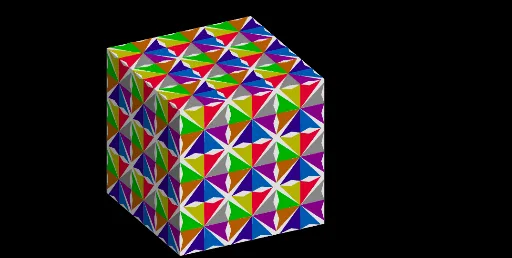
Interactive Paving on the Cube
Loading the math board and drawing, please wait…
This example demonstrates interactive paving on a cube surface, where users can drag sliders to observe how polygonal tiles cover each face dynamically. The core mathematical concepts involve solid geometry (cube structure), geometric transformations (translation, rotation, reflection, similarity), and sequence generation, highlighting positional relationships and symmetry among points, lines, and planes. The construction uses GeoGebra commands such as Circle, Line, Intersect, Polygon, Vector, Point, Segment, Midpoint, Mirror, Translate, Join, Rotate, Sequence, and Cube, with objects like A, B, C, poly1, poly2, and sliders n, u, v to control tile density and orientation. This is suitable for high school or early college students learning 3D geometry and transformations, or for visual exploration of symmetry and tessellation in a spatial context.
GeoGebra Commands & Parameters
Circle(A, Zoom) → cLine(A, xAxis) → bIntersect(c, b) → B, CLine(A, yAxis) → dIntersect(c, d) → D, ELine(B, yAxis) → eLine(C, d) → fLine(D, b) → gLine(E, b) → hIntersect(g, e) → FIntersect(f, g) → GIntersect(h, f) → HIntersect(e, h) → IPolygon(F, G, H, I) → poly1, f_1, g_1, h_1, iVector(I, H) → uVector(I, F) → vPoint(i) → JPoint(f_1) → KSegment(I, G) → jPoint(j) → LSegment(D, B) → kSegment(F, A) → lIntersect(k, l) → MMidpoint(D, M) → NMidpoint(M, B) → OPolygon(F, N, K, L, J, O) → poly2, f_2, n_1, k_1, l_1, j_1, oMirror(F, A) → F'_1Mirror(O, A) → O'_1Mirror(F, j) → F'_2Mirror(N, j) → N'_1Mirror(K, j) → K'_1Mirror(L, j) → L'_1Mirror(J, j) → J'_1Mirror(O, j) → O'_2Polygon(F'_2, N'_1, K'_1, L'_1, J'_1, O'_2) → poly2'_1, f', n', k', l', j', o'Vector(A, P) → wTranslate(F, w) → F'_3Translate(N, w) → N'Translate(K, w) → K'Translate(L, w) → L'Translate(J, w) → J'Translate(O, w) → O'Polygon(F'_3, N', K', L', J', O') → poly2', f'_1, n'_1, k'_1, l'_1, j'_1, o'_1Translate(F'_2, w) → QTranslate(N'_1, w) → RTranslate(K'_1, w) → STranslate(L'_1, w) → TTranslate(J'_1, w) → UTranslate(O'_2, w) → VPolygon(Q, R, S, T, U, V) → poly3, q, r, s, t, u_1, v_1Translate(F, w) → F'Translate(G, w) → G'Translate(H, w) → H'Translate(I, w) → I'Polygon(F', G', H', I') → poly1', f'_2, g', h', i'Mirror(V, g') → V'_1Mirror(Q, g') → Q'_1Mirror(R, g') → R'_1Mirror(S, g') → S'_1Mirror(T, g') → T'_1Mirror(U, g') → U'_1Mirror(V, g') → V'_2Polygon(Q'_1, R'_1, S'_1, T'_1, U'_1, V'_2) → poly3'_1, q', r', s', t', u', v'Mirror(F'_3, f'_2) → WMirror(N', f'_2) → N''_1Mirror(K', f'_2) → K''_1Mirror(L', f'_2) → L''_1Mirror(J', f'_2) → J''_1Mirror(O', f'_2) → O''_1Polygon(W, N''_1, K''_1, L''_1, J''_1, O''_1) → poly2''_1, w_1, n'', k'', l'', j'', o''Mirror(F'_3, g') → ZMirror(N', g') → N''Mirror(K', g') → K''Mirror(L', g') → L''Mirror(J', g') → J''Mirror(O', g') → O''Polygon(Z, N'', K'', L'', J'', O'') → poly2'', z, n''_1, k''_1, l''_1, j''_1, o''_1Mirror(Q'_1, f'_2) → Q''Mirror(R'_1, f'_2) → R''Mirror(S'_1, f'_2) → S''Mirror(T'_1, f'_2) → T''Mirror(U'_1, f'_2) → U''Mirror(V'_2, f'_2) → V''Polygon(Q'', R'', S'', T'', U'', V'') → poly3'', q'', r'', s'', t'', u'', v''Mirror(Q, f'_2) → Q'Mirror(R, f'_2) → R'Mirror(S, f'_2) → S'Mirror(T, f'_2) → T'Mirror(U, f'_2) → U'Mirror(V, f'_2) → V'Polygon(Q', R', S', T', U', V') → poly3', q'_1, r'_1, s'_1, t'_1, u'_1, v'_1Mirror(Z, f'_2) → Z'Mirror(N'', f'_2) → N'''Mirror(K'', f'_2) → K'''Mirror(L'', f'_2) → L'''Mirror(J'', f'_2) → J'''Mirror(O'', f'_2) → O'''Polygon(Z', N''', K''', L''', J''', O''') → poly2''', z', n''', k''', l''', j''', o'''Midpoint(C_1, A_1) → D_1Point(xAxis) → F_1Line(E_1, xAxis) → mJoin(Sequence[Sequence[Polygon[Translate[Q, Vector[(s * u) + (t * v)]], Translate[R, Vector[(s * u) + (t * v)]], Translate[S, Vector[(s * u) + (t * v)]], Translate[T, Vector[(s * u) + (t * v)]], Translate[U, Vector[(s * u) + (t * v)]], Translate[V, Vector[(s * u) + (t * v)]]], s, 0, n, 2], t, 0, n, 2]) → liste1Line(D_1, E_1) → pLine(A_1, B_1) → aRotate(liste1, 90°, a) → liste1'Sequence(Rotate[liste1', i, p], i, 0, (2 * π), (2 * π / 4)) → l1Join(Sequence[Sequence[Polygon[Translate[Q'_1, Vector[(s * u) + (t * v)]], Translate[R'_1, Vector[(s * u) + (t * v)]], Translate[S'_1, Vector[(s * u) + (t * v)]], Translate[T'_1, Vector[(s * u) + (t * v)]], Translate[U'_1, Vector[(s * u) + (t * v)]], Translate[V'_2, Vector[(s * u) + (t * v)]]], s, 0, n, 2], t, 0, n, 2]) → liste2Rotate(liste2, 90°, a) → liste2'Sequence(Rotate[liste2', i, p], i, 0, (2 * π), (2 * π / 4)) → l2Join(Sequence[Sequence[Polygon[Translate[F'_3, Vector[(s * u) + (t * v)]], Translate[N', Vector[(s * u) + (t * v)]], Translate[K', Vector[(s * u) + (t * v)]], Translate[L', Vector[(s * u) + (t * v)]], Translate[J', Vector[(s * u) + (t * v)]], Translate[O', Vector[(s * u) + (t * v)]]], s, 0, n, 2], t, 0, n, 2]) → liste3Rotate(liste3, 90°, a) → liste3'Join(Sequence[Sequence[Polygon[Translate[W, Vector[(s * u) + (t * v)]], Translate[N''_1, Vector[(s * u) + (t * v)]], Translate[K''_1, Vector[(s * u) + (t * v)]], Translate[L''_1, Vector[(s * u) + (t * v)]], Translate[J''_1, Vector[(s * u) + (t * v)]], Translate[O''_1, Vector[(s * u) + (t * v)]]], s, 0, n, 2], t, 0, n, 2]) → liste4Rotate(liste4, 90°, a) → liste4'Sequence(Rotate[liste4', i, p], i, 0, (2 * π), (2 * π / 4)) → l4Join(Sequence[Sequence[Polygon[Translate[Z, Vector[(s * u) + (t * v)]], Translate[N'', Vector[(s * u) + (t * v)]], Translate[K'', Vector[(s * u) + (t * v)]], Translate[L'', Vector[(s * u) + (t * v)]], Translate[J'', Vector[(s * u) + (t * v)]], Translate[O'', Vector[(s * u) + (t * v)]]], s, 0, n, 2], t, 0, n, 2]) → liste5Rotate(liste5, 90°, a) → liste5'Sequence(Rotate[liste5', i, p], i, 0, (2 * π), (2 * π / 4)) → l5Join(Sequence[Sequence[Polygon[Translate[Z', Vector[(s * u) + (t * v)]], Translate[N''', Vector[(s * u) + (t * v)]], Translate[K''', Vector[(s * u) + (t * v)]], Translate[L''', Vector[(s * u) + (t * v)]], Translate[J''', Vector[(s * u) + (t * v)]], Translate[O''', Vector[(s * u) + (t * v)]]], s, 0, n, 2], t, 0, n, 2]) → liste6Rotate(liste6, 90°, a) → liste6'Sequence(Rotate[liste6', i, p], i, 0, (2 * π), (2 * π / 4)) → l6Join(Sequence[Sequence[Polygon[Translate[Q'', Vector[(s * u) + (t * v)]], Translate[R'', Vector[(s * u) + (t * v)]], Translate[S'', Vector[(s * u) + (t * v)]], Translate[T'', Vector[(s * u) + (t * v)]], Translate[U'', Vector[(s * u) + (t * v)]], Translate[V'', Vector[(s * u) + (t * v)]]], s, 0, n, 2], t, 0, n, 2]) → liste7Rotate(liste7, 90°, a) → liste7'Sequence(Rotate[liste7', i, p], i, 0, (2 * π), (2 * π / 4)) → l7Join(Sequence[Sequence[Polygon[Translate[Q', Vector[(s * u) + (t * v)]], Translate[R', Vector[(s * u) + (t * v)]], Translate[S', Vector[(s * u) + (t * v)]], Translate[T', Vector[(s * u) + (t * v)]], Translate[U', Vector[(s * u) + (t * v)]], Translate[V', Vector[(s * u) + (t * v)]]], s, 0, n, 2], t, 0, n, 2]) → liste8Rotate(liste8, 90°, a) → liste8'Sequence(Rotate[liste8', i, p], i, 0, (2 * π), (2 * π / 4)) → l8Cube(A_1, B_1, zAxis) → a_1, G_1, face4, face5, face6, arête2, arête1, arête4, arête6, arête3, arête8, arête10, H_1, arête9, arête5, arête11, arête7, arête12, I_1, J_1, K_1, L_1, face1, face3, face2Rotate(liste1, 180°, m) → l1bRotate(liste2, 180°, m) → l2bRotate(liste3, 180°, m) → l3bRotate(liste4, 180°, m) → l4bRotate(liste5, 180°, m) → l5bRotate(liste6, 180°, m) → l6bRotate(liste7, 180°, m) → l7bRotate(liste8, 180°, m) → l8bSequence(Rotate[liste3', i, p], i, 0, (2 * π), (2 * π / 4)) → l3
AI Drawing Prompt Reference
Draw an interactive paving pattern on a cube surface. Start with a circle whose horizontal and vertical diameters intersect the axes, creating four points that define an outer square. Inside the square, connect diagonal points and midpoints to form several polygonal regions. Then, apply reflection and translation to duplicate one polygon into adjacent positions, creating a repeating tiling unit. Two sliders control the density and orientation of the tiles, dynamically showing symmetry and transformation effects.
The prompt above was compiled from the original drawing commands and is for reference only.