
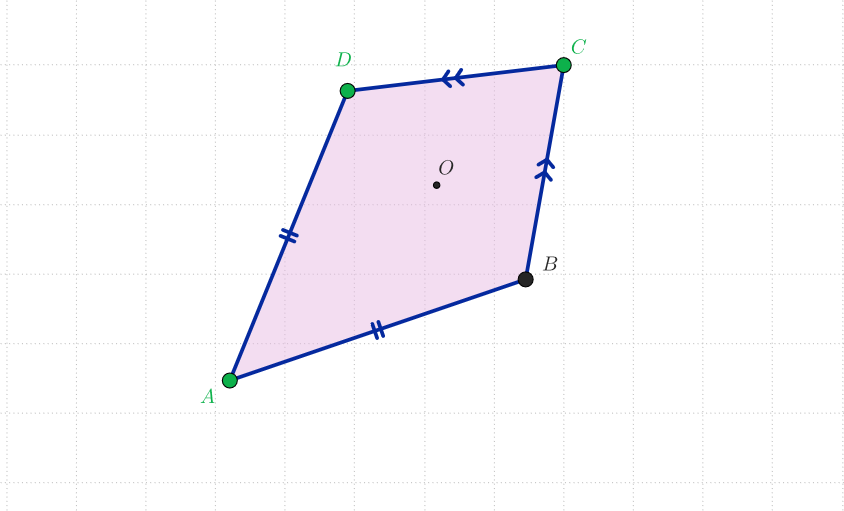
Interactive GeoGebra Construction of a Kite Quadrilateral
Loading the math board and drawing, please wait…
In collections
The GeoGebra's Toolbox for Teachers and Students
This example demonstrates how to interactively construct a kite (kite quadrilateral) in GeoGebra and explore how the figure’s constraints and geometry relationships change with construction steps. Key mathematics concepts include kite quadrilateral structure, polygon/quad construction, symmetry and mirror-based reasoning, and the use of auxiliary perpendicular lines to establish geometric relationships. Construction uses GeoGebra commands Segment, Point, OrthogonalLine, Mirror, and Polygon to create the defining vertices and edges; it relies on multiple generated points (e.g., A, B, C, D and derived points such as a, b, c, d, e, f, q1, a_1, b_1, c_1, d_1) to support the boundary segments and the mirror symmetry that characterizes the kite. Suitable for middle-school geometry, teaching quadrilateral properties and geometric construction, as well as for interactive exploration in class or self-study.
GeoGebra Commands & Parameters
Segment(A, C) → aPoint(a) → OOrthogonalLine(O, a) → bPoint(b) → DMirror(D, a) → BSegment(A, B) → cSegment(B, C) → dSegment(C, D) → eSegment(D, A) → fPolygon(A, D, C, B) → q1, a_1, d_1, c_1, b_1
AI Drawing Prompt Reference
Construct a kite-shaped quadrilateral. Start by drawing a horizontal line segment as a baseline. Pick a point on this segment and draw a perpendicular line through it. Choose another point on the perpendicular line, then create its mirror image across the baseline. Finally, connect the endpoints of the baseline with the mirrored point and the point on the perpendicular line to form a closed quadrilateral. The resulting shape has two pairs of adjacent equal sides, exhibiting the characteristic kite geometry.
The prompt above was compiled from the original drawing commands and is for reference only.