
Interactive exploration of the linear graph y=mx+c: slope and intercept
Loading the math board and drawing, please wait…
In collections
Introduction to Linear Functions and Graphs
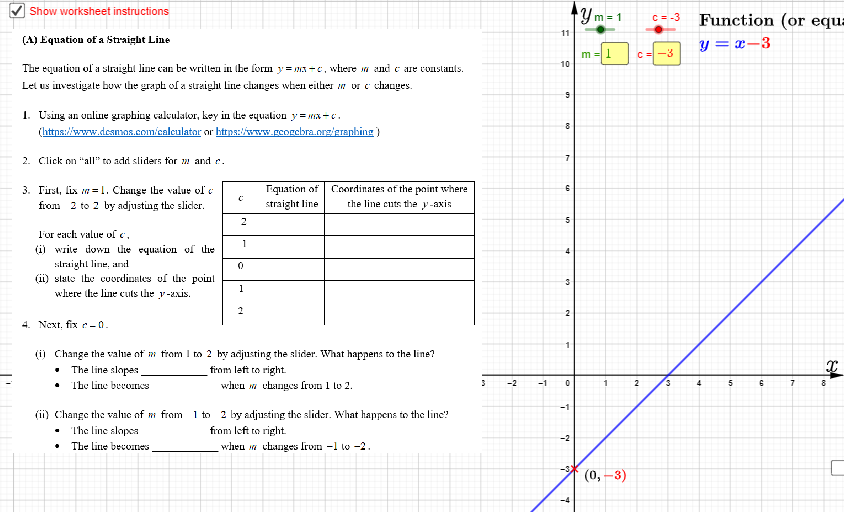
This GeoGebra example demonstrates how the graph of the linear function y = mx + c changes as the parameters m (slope) and c (intercept) are adjusted, helping learners visualize the geometric meaning of slope and intercept through a dynamically updated line. Key concepts include linear functions, slope (m), intercept (c), the equation of a line, and the role of intersections in understanding relationships between geometric objects. Construction highlights: Simplify is used to streamline expressions; Intersect finds key intersection points; Point and Line create the essential geometric elements; Textfield (along with text objects such as text1/text2) presents parameter values and explanations; InputBox1/InputBox2 allow direct entry of m and c; button1/button2 control actions, while traceline and traceyint enable dynamic drawing/trajectory-style updates. The scene includes objects like m, c, f, pic1, and auxiliary points/lines (e.g., A, B, g, incr, b) to manage the interactive setup. Suitable for secondary school learners and for classroom demonstrations or inquiry-based activities on graphing and function analysis.
GeoGebra Commands & Parameters
Simplify((m * x) + c) → fIntersect(f, yAxis) → CPoint(f) → APoint(f) → BLine(A, B) → gTextfield(m) → InputBox1Textfield(c) → InputBox2
AI Drawing Prompt Reference
Draw a dynamic straight line with equation y = slope times x plus intercept. Show the line on a coordinate plane and mark its intersection with the y-axis. Place two movable points on the line to define its position. Include two input boxes for entering the slope and intercept values, along with text displaying current parameters. As the user adjusts inputs, the line updates in real time, illustrating the geometric meaning of slope and intercept.
The prompt above was compiled from the original drawing commands and is for reference only.