
Integer Division Practice Exercise (Interactive GeoGebra Worksheet)
Loading the math board and drawing, please wait…
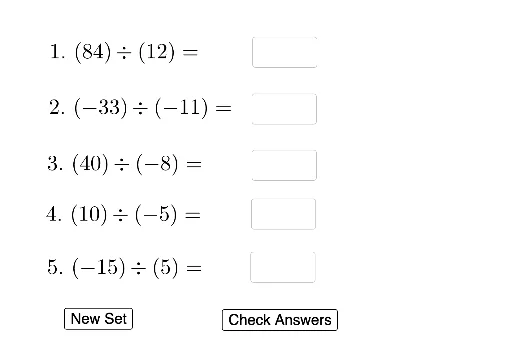
① This example is an interactive GeoGebra worksheet for practicing integer division, generating random problems and providing immediate feedback to help students master the rules of dividing integers. ② The core mathematical concepts include integer division, sign rules for positive and negative numbers, divisibility and remainders, and verification of results. ③ Construction highlights: from the construction summary, it uses Random and RandomElement commands to generate random dividends and divisors, Textfield and InputBox for answer input, If commands to check correctness and update the score, buttons (button1, button2) for generating new problems and checking, with objects such as List1, List2, variables (a1,b1,s1,r1, etc.) and text displays (text1, textR1, etc.), forming a complete practice and scoring system. ④ It is suitable for upper elementary to lower middle school students (ages 10-14), for classroom practice, homework, or self-study, and can also serve as a template for teachers to create similar exercises.
GeoGebra Commands & Parameters
Random(-5, 5) → mRandom(-5, 5) → bRandomElement(List2) → b1RandomElement(List1) → a1Textfield(r1) → InputBox1RandomElement(List1) → a2RandomElement(List2) → b2RandomElement(List1) → a3RandomElement(List2) → b3RandomElement(List1) → a4RandomElement(List2) → b4RandomElement(List1) → a5RandomElement(List2) → b5Textfield(r2) → InputBox2Textfield(r3) → InputBox3Textfield(r4) → InputBox4Textfield(r5) → InputBox5If(b1 ≟ r1, "Correct", "Incorrect") → textR1If(b2 ≟ r2, "Correct", "Incorrect") → textR2If(b3 ≟ r3, "Correct", "Incorrect") → textR3If(b4 ≟ r4, "Correct", "Incorrect") → textR4If(b5 ≟ r5, "Correct", "Incorrect") → textR5
AI Drawing Prompt Reference
Create an interactive integer division practice worksheet. Display five random division problems, each showing a dividend, divisor, and an input box with a feedback label next to it. Below the problems, show a score display and two buttons: one to generate new problems and one to check answers. Arrange all elements neatly for student use.
The prompt above was compiled from the original drawing commands and is for reference only.