
Inner Parallelogram Construction
Loading the math board and drawing, please wait…
In collections
Exploring Feyman's Triangle
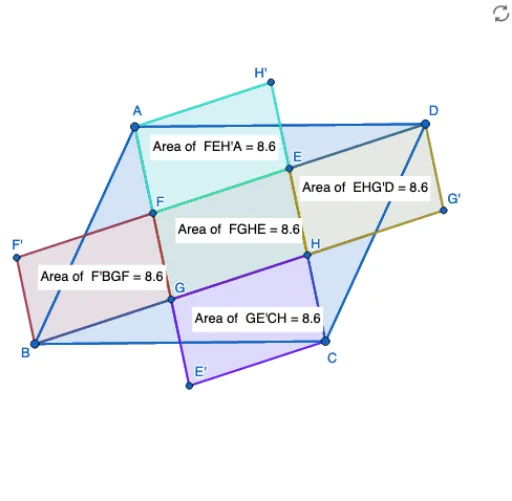
This example demonstrates the geometric construction of an inner parallelogram using transformations. Key math concepts include parallelogram properties, similarity transformations, rotation, and dilation. GeoGebra commands used are Segment, Line, Intersect, Dilate, Polygon, Rotate, and PointIn. Suitable for high school mathematics education to understand geometric transformations and figure construction.
GeoGebra Commands & Parameters
Segment(B, A) → fLine(C_1, f) → gLine(B, D_1) → hIntersect(h, g) → CLine(A, h) → iIntersect(g, i) → DSegment(A, D) → jSegment(B, C) → kSegment(C, D) → lDilate(A, 1 / 2, B) → A'Dilate(B, 1 / 2, C) → B'Dilate(C, 1 / 2, D) → C'Dilate(D, 1 / 2, A) → D'Segment(A, B') → mSegment(B, C') → nSegment(D, A') → pSegment(C, D') → qIntersect(m, p) → FIntersect(m, n) → GIntersect(n, q) → HIntersect(p, q) → EPolygon(B, A, D, C) → q1, b, a, d, cPolygon(F, G, H, E) → q2, f_1, e, g_1, h_1Intersect(f, p) → IPolygon(I, F, A) → t1, a_1, i_1, f_2Rotate(I, 180°, I) → I'Rotate(F, 180°, I) → F'Rotate(A, 180°, I) → A'_1Polygon(I', F', A'_1) → t1', a'_1, i', f'Polygon(F', B, G, F) → q3, r, b_1, e_1, f_3Intersect(k, m) → JPolygon(G, B, J) → t2, j_1, e_2, b_2Rotate(G, 180°, J) → E'Rotate(B, 180°, J) → B'_1Rotate(J, 180°, J) → J'Polygon(E', B'_1, J') → t2', j', e', b'_1Polygon(G, E', C, H) → q4, e_3, s, c_1, g_2Intersect(l, n) → KPolygon(K, H, C) → t3, c_2, k_1, g_3Rotate(K, 180°, K) → K'Rotate(H, 180°, K) → G'Rotate(C, 180°, K) → C'_1Polygon(K', G', C'_1) → t3', c'_1, k', g'Polygon(E, H, G', D) → q5, h_2, g_4, t, d_1Intersect(j, q) → LPolygon(L, E, D) → t4, d_2, l_1, h_3Rotate(L, 180°, L) → L'Rotate(E, 180°, L) → H'Rotate(D, 180°, L) → D'_1Polygon(L', H', D'_1) → t4', d'_1, l', h'Polygon(F, E, H', A) → q6, f_4, h_4, m_1, a_2PointIn(q3) → Pointq3PointIn(q2) → Pointq2PointIn(q6) → Pointq6PointIn(q5) → Pointq5PointIn(q4) → Pointq4
AI Drawing Prompt Reference
Start with an arbitrary quadrilateral, connecting its four vertices in order. From the midpoint of one side, draw a line parallel to the opposite side, intersecting a diagonal to form an inner parallelogram. Then, take the midpoints of the original quadrilateral's sides and connect adjacent midpoints to create a second parallelogram. Next, rotate the adjacent triangles by 180 degrees around the vertices of the inner parallelogram, producing symmetric triangle groups. Finally, connect the rotated points with midpoints to form several small triangles and quadrilaterals, resulting in a symmetric geometric pattern.
The prompt above was compiled from the original drawing commands and is for reference only.