
Quadratic Equations & Equilateral Triangles Interaction
Loading the math board and drawing, please wait…
In collections
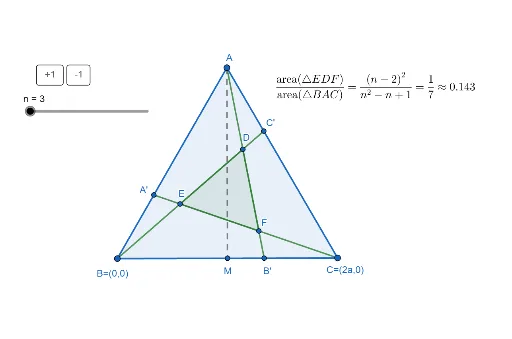
Exploring Feyman's Triangle
This example demonstrates the geometric relationship between quadratic equations and equilateral triangles interactively. It involves core math concepts like quadratic equations, equilateral triangles, calculus, and number theory (LCM & GCD). Construction highlights include GeoGebra commands such as Circle, Intersect, Segment, Midpoint, Dilate, Polygon, FractionText, and Text. Suitable for high school and above students to understand the application of geometric construction combined with algebra.
GeoGebra Commands & Parameters
Circle(B, A) → dCircle(A, B) → cIntersect(c, d, 1) → CSegment(A, B) → fSegment(A, C) → gSegment(C, B) → hMidpoint(A, B) → MSegment(C, M) → iDilate(C, 1 / n, A) → C'Dilate(A, 1 / n, B) → A'Segment(C, A') → jDilate(B, 1 / n, C) → B'Segment(A, B') → kSegment(B, C') → lIntersect(l, k) → EIntersect(l, j) → FIntersect(k, j) → DPolygon(A, C, B) → t1, b, a, c_1Polygon(E, D, F) → t2, f_1, e, d_1FractionText(t2 / t1) → text1Text(t2 / t1) → text3
AI Drawing Prompt Reference
Draw two circles that intersect at a point. Connect the intersection point with the circle centers to form a triangle. Find the midpoint of one side and construct a line segment. Scale the triangle vertices to create new points, then connect them to form two new triangles. Calculate and display the ratio of the areas of these triangles, labeling the result with text.
The prompt above was compiled from the original drawing commands and is for reference only.