
3D Line Segment Transformation Demo
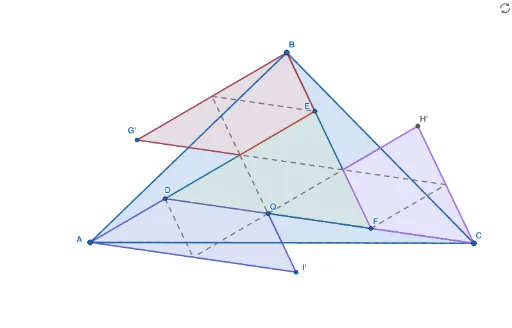
Loading the math board and drawing, please wait…
In collections
Exploring Feyman's Triangle
This example demonstrates geometric transformations of line segments in 3D space, including dilation, rotation, and intersection. Core math concepts involve line segments, 3D vectors, transformations (scaling, rotation), intersection calculations, and polygon construction. GeoGebra commands used include Segment, Dilate, Intersect, Polygon, Midpoint, Line, and Rotate. Suitable for high school and university students learning 3D geometry, vectors, and transformations.
GeoGebra Commands & Parameters
Segment(A, B) → fSegment(A, C) → gSegment(B, C) → hDilate(B, 1 / 4, A) → B'Dilate(C, 1 / 4, B) → C'Dilate(A, 1 / 4, C) → A'Segment(A, C') → iSegment(C, B') → jSegment(B, A') → kIntersect(i, j) → DIntersect(i, k) → EIntersect(j, k) → FPolygon(D, E, F) → t1, f_1, d, ePolygon(A, B, C) → t2, c, a, bMidpoint(D, E) → GMidpoint(E, F) → HMidpoint(D, F) → ISegment(G, I) → lSegment(I, H) → mSegment(H, G) → nLine(G, I) → pLine(I, H) → qLine(H, G) → rIntersect(p, b) → JIntersect(q, a) → KIntersect(r, c) → LPolygon(A, L, G) → t3, g_1, a_1, l_1Rotate(A, (-(180°)), L) → A'_1Rotate(L, (-(180°)), L) → L'Rotate(G, (-(180°)), L) → G'Polygon(A'_1, L', G') → t3', g', a'_1, l'Midpoint(l') → MSegment(G, M) → sSegment(M, E) → tSegment(B, E) → h_1Segment(I, J) → i_1Segment(I, C) → j_1Polygon(J, I, C) → t4, c_1, j_2, i_2Rotate(J, 180°, J) → J'Rotate(I, 180°, J) → I'Rotate(C, 180°, J) → C'_1Polygon(J', I', C'_1) → t4', c'_1, j', i'Midpoint(A, I') → NSegment(D, N) → k_1Segment(I, N) → m_1Segment(H, K) → n_1Polygon(B, H, K) → t5, k_2, b_1, h_2Rotate(B, (-(180°)), K) → B'_1Rotate(H, (-(180°)), K) → H'Rotate(K, (-(180°)), K) → K'Polygon(B'_1, H', K') → t5', k', b'_1, h'Midpoint(k') → OSegment(F, O) → p_1Segment(O, H) → q_1Intersect(f_1, l) → PPolygon(P, G', B, E) → q1, p_2, r_1, b_2, e_1Intersect(e, l) → QPolygon(A, D, Q, I') → q2, a_2, d_1, q_2, s_1Intersect(d, m) → RPolygon(R, F, C, H') → q3, r_2, f_2, c_2, t_1
AI Drawing Prompt Reference
Draw a triangle in 3D space. Scale each vertex toward the opposite vertex by one quarter, creating points on the sides. Connect each original vertex to the scaled point on the opposite side, forming three cevians. Mark their intersections as a central triangle. Take midpoints of this central triangle's sides and connect them to form a smaller triangle. Extend these sides to meet the original triangle's sides, marking new intersection points. Construct several triangles using these points and midpoints, then rotate some triangles 180 degrees about certain vertices to create symmetric shapes. Finally, connect specific midpoints and intersections to complete the transformation demo.
The prompt above was compiled from the original drawing commands and is for reference only.