
Inner Parallelogram Animation
Loading the math board and drawing, please wait…
In collections
Exploring Feyman's Triangle
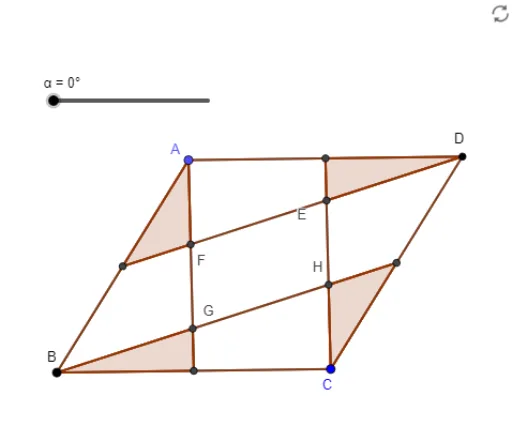
This example demonstrates the animation of an inner parallelogram. Key mathematical concepts include the properties of parallelograms, line intersections, segments, midpoints, polygons, and rotations. Using GeoGebra commands such as Line, Intersect, Segment, Midpoint, Polygon, and Rotate, the construction process of the parallelogram is dynamically shown. Suitable for middle school and above students to learn geometric transformations and dynamic geometry.
GeoGebra Commands & Parameters
Line(A, B) → fLine(B, C) → gLine(A, g) → hLine(C, f) → iIntersect(h, i) → DSegment(B, A) → jSegment(A, D) → kSegment(D, C) → lSegment(C, B) → mMidpoint(j) → MMidpoint(k) → PMidpoint(l) → OMidpoint(m) → NSegment(A, N) → nSegment(P, C) → pSegment(B, O) → qSegment(M, D) → rIntersect(n, r) → FIntersect(p, r) → EIntersect(p, q) → HIntersect(n, q) → GPolygon(A, M, F) → t1, f_1, a, m_1Rotate(A, α, M) → A'Rotate(M, α, M) → M'Rotate(F, α, M) → F'Polygon(A', M', F') → t1', f', a', m'Polygon(P, E, D) → t2, d, p_1, eRotate(P, α, P) → P'Rotate(E, α, P) → E'Rotate(D, α, P) → D'Polygon(P', E', D') → t2', d', p', e'Polygon(H, O, C) → t3, c, h_1, oPolygon(G, N, B) → t4, b, g_1, n_1Rotate(H, α, O) → H'Rotate(O, α, O) → O'Rotate(C, α, O) → C'Polygon(H', O', C') → t3', c', h', o'Rotate(G, α, N) → G'Rotate(N, α, N) → N'Rotate(B, α, N) → B'Polygon(G', N', B') → t4', b', g', n'Polygon(A, F, E, P) → q1, a_1, f_2, e_1, p_2Polygon(D, E, H, O) → q2, d_1, e_2, h_2, o_1Polygon(H, C, N, G) → q3, h_3, c_1, n_2, g_2Polygon(F, M, B, G) → q4, f_3, m_2, b_1, g_3
AI Drawing Prompt Reference
Draw an animated inner parallelogram showing the rotation of its sides, vertices, and midpoints. Start by drawing two line segments to establish the base sides, then find their intersection to form the fourth side of the parallelogram. Calculate the midpoints of each side and connect them to create a new quadrilateral. Use a slider to control the rotation angle, dynamically demonstrating the rotation of the parallelogram and its inner shape, highlighting geometric transformations and symmetry.
The prompt above was compiled from the original drawing commands and is for reference only.