
Increasing and Decreasing Functions
Loading the math board and drawing, please wait…
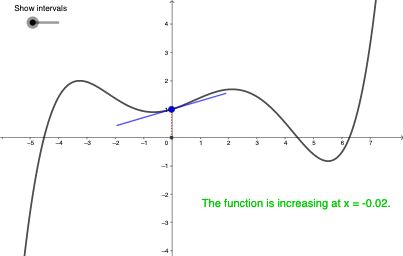
This example illustrates the concept of increasing and decreasing functions. Increasing and decreasing functions describe the upward or downward trend of a function's graph. By constructing the function graph, tangent lines, and slopes, one can visually understand the definition of increasing and decreasing functions. Commands like Tangent, Slope, and Segment are used. Suitable for high school mathematics education and learning.
GeoGebra Commands & Parameters
Tangent(P, g) → hSlope(h) → bSegment(B_{1}, P) → iMax(g, -7, 10) → CMin(g, -3, 7) → DMax(g, -4, -2) → AMin(g, -3, 1) → BPoint(xAxis) → IRay(E, I) → jSegment(E, F) → kSegment(F, G) → lSegment(G, H) → mPoint(xAxis) → JRay(H, J) → nCircle(P, 2) → cIntersect(c, h) → K, LSegment(K, L) → pSegment(A, E) → qSegment(B, F) → rSegment(C, G) → sSegment(H, D) → t
AI Drawing Prompt Reference
Draw a function graph to illustrate increasing and decreasing functions. Start by plotting the function curve g, then draw a tangent line h at a point P on the curve and label its slope b. Next, draw rays j and n from points I and J on the x-axis. Find the maximum and minimum points C and D on the graph, as well as points A and B within the intervals [-4,-2] and [-3,1]. Use these points to draw segments i, k, l, m, q, r, s, and t. Finally, find the intersection points K and L of the tangent line h with circle c and draw segment p.
The prompt above was compiled from the original drawing commands and is for reference only.