
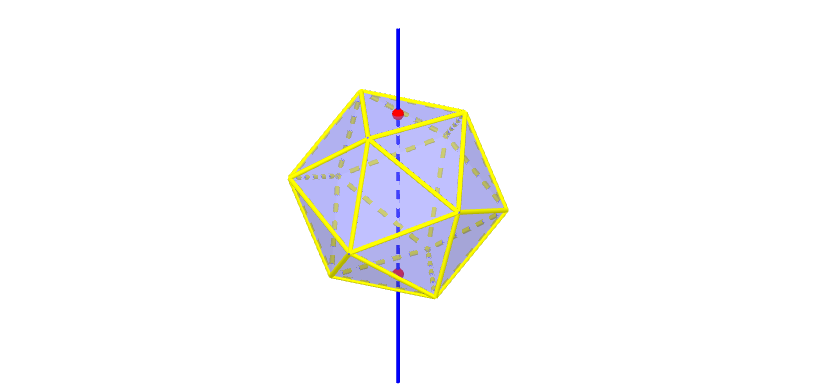
Icosahedron's Rotational Symmetry
Loading the math board and drawing, please wait…
In collections
Rotational Symmetries of Platonic Solids
This example demonstrates the rotational symmetry of an icosahedron. Key math concepts include rotation, solid geometry, symmetry, and geometric transformations. It uses GeoGebra commands like Icosahedron, Circle, Center, Midpoint, PointIn, Line, and Rotate. Suitable for high school students and math enthusiasts studying solid geometry and transformation symmetry.
GeoGebra Commands & Parameters
Icosahedron(A, B, xOyPlane) → a, C, L, face1, face2, face3, face4, face5, face6, face7, face8, face9, D, face10, face11, face12, face13, face14, face15, face16, face17, face18, face19, E, face20, edge1, edge2, edge3, edge4, edge5, edge6, edge7, edge8, edge9, F, edge10, edge11, edge12, edge13, edge14, edge15, edge16, edge17, edge18, edge19, G, edge20, edge21, edge22, edge23, edge24, edge25, edge26, edge27, edge28, edge29, H, edge30, I, J, KCircle(J, K, L) → eCircle(A, B, C) → fCenter(e) → MCenter(f) → NMidpoint(edge27) → OMidpoint(edge25) → PMidpoint(edge23) → QMidpoint(edge1) → RMidpoint(edge2) → SMidpoint(edge3) → TPointIn(face16) → UPointIn(face1) → VLine(U, V) → bRotate(face1, (-α), b) → face1'Rotate(face10, (-α), b) → face10'Rotate(face11, (-α), b) → face11'Rotate(face12, (-α), b) → face12'Rotate(face13, (-α), b) → face13'Rotate(face14, (-α), b) → face14'Rotate(face15, (-α), b) → face15'Rotate(face16, (-α), b) → face16'Rotate(face17, (-α), b) → face17'Rotate(face18, (-α), b) → face18'Rotate(face19, (-α), b) → face19'Rotate(face2, (-α), b) → face2'Rotate(face20, (-α), b) → face20'Rotate(face3, (-α), b) → face3'Rotate(face4, (-α), b) → face4'Rotate(face5, (-α), b) → face5'Rotate(face6, (-α), b) → face6'Rotate(face7, (-α), b) → face7'Rotate(face8, (-α), b) → face8'Rotate(face9, (-α), b) → face9'
AI Drawing Prompt Reference
Draw an icosahedron and demonstrate its rotational symmetry. First, construct the faces and edges of the icosahedron, then use one edge as an axis to rotate one face by a certain angle, and subsequently rotate the other faces in the same manner to show the symmetric shape after rotation.
The prompt above was compiled from the original drawing commands and is for reference only.