
HYPERCUBE? NO
Loading the math board and drawing, please wait…
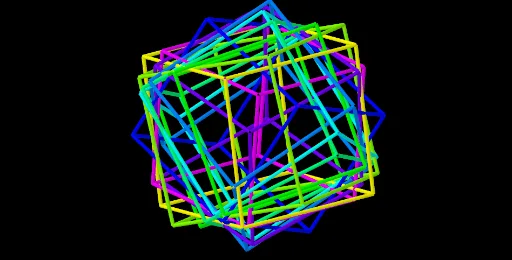
This example demonstrates the 3D rotation and projection of a hypercube, involving core math concepts like solid geometry, rotation, definite integral, random variables, cylinder, natural numbers, and statistical characteristics. It utilizes GeoGebra commands and objects such as Point, Cube, Intersect, Sequence, Element. Suitable for high school students and math enthusiasts exploring higher-dimensional geometry and related applications.
GeoGebra Commands & Parameters
Point(Circle[B, Distance[C, B], Segment[C, B]]) → ECube(C, B, E) → a, F, FaceEFJI, FaceGHIJ, areteCF, areteBC, areteBE, areteEF, areteCG, areteFJ, areteGJ, areteGH, G, areteBH, areteHI, areteEI, areteIJ, H, I, J, FaceBCFE, FaceCFJG, FaceBCGH, FaceBEIHIntersect(xAxis, yAxis) → KSequence(Rotate[Rotate[Dilate[Cube[C, B, E], r^(k - 1), K], (γ * (k - 1)), K], (γ * (k - 1)), xAxis], k, 1, n) → Liste1Element(Liste1, A1) → B1Element(Liste1, A2) → B2Element(Liste1, A3) → B3Element(Liste1, A4) → B4Element(Liste1, A5) → B5Element(Liste1, A6) → B6Element(Liste1, A7) → B7Element(Liste1, A8) → B8Element(Liste1, A9) → B9Element(Liste1, A10) → B10Element(Liste1, A11) → B11Element(Liste1, A12) → B12Element(Liste1, A13) → B13Element(Liste1, A14) → B14Element(Liste1, A15) → B15Element(Liste1, A16) → B16Element(Liste1, A17) → B17Element(Liste1, A18) → B18Element(Liste1, A19) → B19Element(Liste1, A20) → B20Element(Liste1, A21) → B21
AI Drawing Prompt Reference
Draw a cube, then rotate and project it around an axis to show its 3D rotation and projection, involving multiple rotated cubes to demonstrate higher-dimensional geometry and statistical characteristics.
The prompt above was compiled from the original drawing commands and is for reference only.