
How Many Hidden Dots? Counting Hidden Vertices via Sampling
Loading the math board and drawing, please wait…
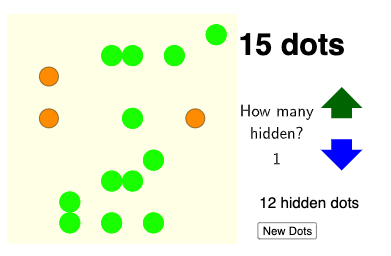
This example demonstrates how to determine the number of “hidden” dots within a constructed planar configuration built from polygons (including rhombus-like parts and internal layout). Learners can observe which candidate points become hidden and then compute the total count using a reproducible computational geometry workflow. The key mathematical ideas are plane geometry (polygon structure and embedded regions), discrete sampling along geometric objects, and distance-based decisions using Length; it also connects naturally to arithmetic operations and term-like bookkeeping for counting. Construction highlights in GeoGebra: Flatten is used to turn nested generated data (points/objects) into a single list; Sample performs discrete sampling on selected geometric entities (e.g., polygon edges or paths) to create candidate points; Length measures distances to test geometric conditions that determine whether a point is considered hidden; Polygon builds the involved polygonal regions; and TableText displays the computed variables and the final count in a clear table/text form. Suitable for middle to early university students, especially for geometry exploration with GeoGebra and for activities focused on modeling, rule-based classification, and result summarization.
GeoGebra Commands & Parameters
Flatten(Sequence[Sequence[Circle[(a, b), 1], a, 1, 19, 2], b, 1, 19, 2]) → l1Flatten(Sequence[Sequence[(a, b), a, 1, 19, 2], b, 1, 19, 2]) → l3Sample(l3, Random[5, 15], false) → l2, {(11, 11), (11, 5), (19, 19), (9, 17), (9, 1), (13, 1), (9, 5), (5, 3), (13, 7), (17, 11), (3, 15), (3, 11), (5, 1), (11, 17), (15, 17)}Length(l2) → aSample(l2, Random[2, Length[l2] - 1], false) → l4, {(15, 17), (19, 19), (11, 5), (9, 1), (11, 11), (9, 5), (11, 17), (9, 17), (13, 7), (5, 3), (13, 1), (5, 1)}Polygon(A, B, C, D, E, F, G) → poly1, a_1, b, c, d, e, f, gPolygon(H, I, J, K, L, M, N) → poly2, h, i, j, k, l, m, nPolygon((-1, -1), (-1, 21), (21, 21), (21, -1)) → q1, p, q, r, sTableText({"How many"}, {"hidden?"}, {""}, {cnt}, "c") → text2Length(l4) → o
AI Drawing Prompt Reference
In a coordinate plane, draw circles of radius 1 centered at odd-coordinate points (from 1 to 19 with step 2), and list these center points. Randomly select 5 to 15 of these points as candidates, then randomly pick a subset of them as hidden points. Construct two heptagonal regions)Skip the rest? Actually, construct two heptagons and a large rectangle border covering the whole area. Finally, display a table asking 'How many hidden?' and show the count of hidden points.
The prompt above was compiled from the original drawing commands and is for reference only.