
Horizontal Translations of Quadratic Functions
Loading the math board and drawing, please wait…
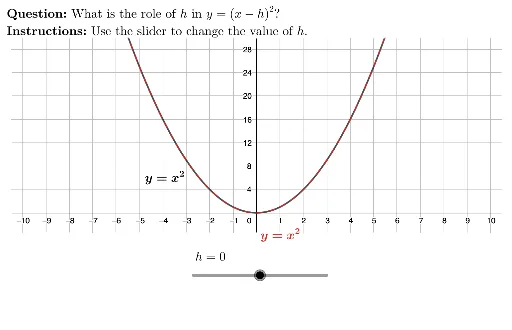
This example demonstrates the horizontal translations of quadratic function graphs. It involves core math concepts like quadratic functions, translation transformations, and function graph transformation rules. The construction uses commands like UnicodeToLetter and LaTeX, interactive objects such as HowDidIDo and TryAnother, and feedback elements like background, xmark, cmark. Key commands include c, h, lblParentFunc, lblTransformFunc, d, txtHlbl. Suitable for high school students learning function graph transformations and understanding the impact of parameters on function graphs.
GeoGebra Commands & Parameters
UnicodeToLetter(10007) → xmarkUnicodeToLetter(10003) → cmarkLaTeX("y=x^2") → lblParentFuncLaTeX(AHKtoVertexForm[1, h, 0]) → lblTransformFuncLaTeX((((("\text{\textbf{Question: }" * MainInstruc) * "\\\textbf{Instructions: }") * SpecInstruc) * "}")) → allInstruc
AI Drawing Prompt Reference
Draw a parabola opening upwards, then perform horizontal translations by moving the graph along the x-axis. First, draw the standard quadratic function y=x², then change it to y=(x-h)² by adjusting parameter h to observe how the graph translates horizontally. Finally, follow the instructions to input questions and understand how parameter h affects the position of the function graph.
The prompt above was compiled from the original drawing commands and is for reference only.