
Height in a Parallelogram
Loading the math board and drawing, please wait…
In collections
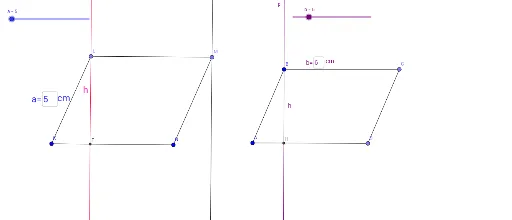
Creating Height and Area Relation in Parallelogram
This GeoGebra example demonstrates the construction of the height (altitude) of a parallelogram, illustrating the perpendicular relationship between the height and the base. It involves core mathematical concepts such as parallelograms, perpendicular lines, and area calculation. The construction uses fundamental GeoGebra commands including Point, Segment, OrthogonalLine, and Intersect to define points, segments, and intersection points, with Textfield objects marking key elements. Suitable for middle and high school geometry classes, it helps students visually understand how the height is determined and how it applies to the area formula of a parallelogram.
GeoGebra Commands & Parameters
Point(Circle[K, a]) → LSegment(K, L) → fPoint(Circle[N, a]) → MSegment(N, M) → gSegment(L, M) → hSegment(K, N) → iTextfield(a) → MetinAlanı1OrthogonalLine(L, i) → jIntersect(j, i) → FPoint(Circle[A, b]) → DSegment(A, D) → kPoint(Circle[B, b]) → CSegment(B, C) → lSegment(A, B) → mSegment(D, C) → nTextfield(b) → MetinAlanı2OrthogonalLine(B, k) → pIntersect(p, k) → HOrthogonalLine(M, i) → q
AI Drawing Prompt Reference
Draw a parallelogram ABCD with AB and CD as the bases and AD and BC as the sides. Construct a perpendicular from point A to AD, intersecting BC at point H, which is the height of the parallelogram. Then, construct a perpendicular from point B to BC, intersecting AD at point F, which is also the height of the parallelogram. Finally, connect points C and D to form the other side of the parallelogram.
The prompt above was compiled from the original drawing commands and is for reference only.