
Grid Lines on Surface
Loading the math board and drawing, please wait…
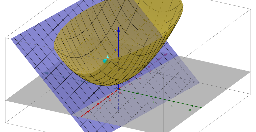
This example demonstrates grid lines on a surface. It involves coordinate geometry and surface equations. By using the Sequence command to generate a series of points and the Derivative command to calculate the derivative of the surface, grid lines on the surface can be constructed. Suitable for high school and above students to learn surface geometry and calculus.
GeoGebra Commands & Parameters
Sequence(CurveCartesian[t, u, a(t, u), u, -10, 10], t, -10, 10) → list1Sequence(CurveCartesian[u, t, a(u, t), u, -10, 10], t, -10, 10) → list2Derivative(a(x, y), x) → bDerivative(a(x, y), y) → cSequence(CurveCartesian[t, u, d(t, u), u, -10, 10], t, -10, 10) → list3Sequence(CurveCartesian[u, t, d(u, t), u, -10, 10], t, -10, 10) → list4