
Graphing Tangent Functions by mathspace
Loading the math board and drawing, please wait…
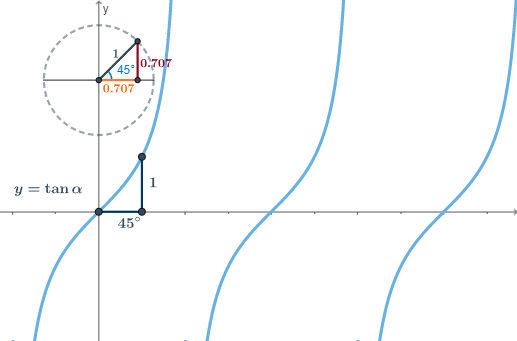
This example demonstrates the process of graphing tangent functions. Key mathematical concepts include trigonometry and the unit circle. Using GeoGebra commands such as Line, Circle, Intersect, Rotate, etc., the properties of the tangent function are dynamically illustrated. Suitable for high school mathematics education and learning.
GeoGebra Commands & Parameters
Line(B, O) → aCircle(O, 1) → cIntersect(c, a, 2) → CRotate(C, α, O) → DAngle(C, O, D) → βSegment(O, D) → bDistance(D, a) → dOrthogonalLine(D, a) → eIntersect(a, e) → A_2Segment(D, A_2) → gSegment(A_1, D_1) → hMidpoint(D, A_2) → E1Midpoint(A_1, D_1) → FPoint(xAxis) → GSegment(G, A_1) → iIntersect(c, a, 2) → AIntersect(c, a, 1) → ISegment(I, A) → jIntersect(c, j, 2) → JSegment(O, A_2) → lMidpoint(O, D) → KMidpoint(O, A_2) → E2Midpoint(O, D) → E
AI Drawing Prompt Reference
In a coordinate plane, place the origin O and draw the unit circle centered at O with radius 1. Draw a line through O using a given point B, and find its intersection with the unit circle to obtain C. Rotate the intersection point C about O by an angle α to get D, and form the angle ∠COD to represent β. Construct the segment OD as a key reference. Through D, draw an orthogonal line to the earlier line, intersect it with the original line to obtain A2, and draw the segment DA2 to build the tangent-related configuration. Use the intersections of the unit circle with the original line (such as A and I) to form additional segments and connect these points back to O; use midpoints of lines like OD and OA2 as supporting geometry for the final diagram.
The prompt above was compiled from the original drawing commands and is for reference only.