
Graphing Sinusoidal Functions (All Transformations)
Loading the math board and drawing, please wait…
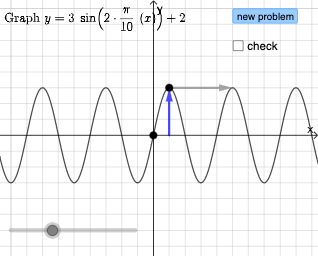
This example demonstrates how to use GeoGebra to graph sinusoidal functions and all their transformations. Key mathematical concepts include sine and cosine functions and their transformations. Using commands like Ray, PointIn, Vector, and Segment, you can dynamically adjust the phase, amplitude, period, and shift of the function graph. Suitable for high school math education and learning about sine function transformations.
GeoGebra Commands & Parameters
Ray(D, D + (1, 0)) → iPointIn(x ≥ x(A) + 0.5) → BVector((0, y(F)), F) → uVector((x(F), 0), F) → vVector(Midpoint[F, H], G) → wVector(G, G + (per, 0)) → eSegment(F, H) → jRandom(1, 10) → lRandom(-8, 8) → mRandom(-8, 8) → nRandomElement({-5, -4, -3, -2, -1, 1, 2, 3, 4, 5}) → kIf(correct ≟ false, "This graph is incorrect.", "") → text9
AI Drawing Prompt Reference
Draw a sinusoidal function graph showing its basic shape and transformations. The graph should include a complete sine wave with clear peaks and troughs. You can adjust amplitude, period, and horizontal shift to change the shape. Ensure the graph is centered in the coordinate system and label key points like peaks and troughs.
The prompt above was compiled from the original drawing commands and is for reference only.