
Graphing Sine and Cosine Functions
Loading the math board and drawing, please wait…
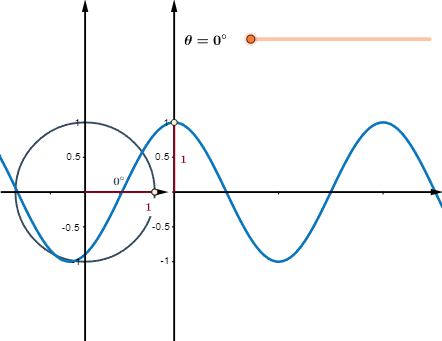
This example demonstrates the graphing of sine and cosine functions. Key mathematical concepts include trigonometric functions, unit circle, and parametric curves. Using GeoGebra commands such as Point, Rotate, Circle, etc., the dynamic changes in function graphs are shown. Suitable for high school math education and learning.
GeoGebra Commands & Parameters
Point(Ray[(0, 0), (-1, 0)]) → BRotate(A, θ, B) → PRotate(A, θ, B) → A'Angle(A, B, A') → αRotate(A, θ, B) → A'_1Angle(A, B, A'_1) → βSegment(Q, (x(Q), 0)) → eSegment((0, 0), (x(Q), 0)) → gCircle(B, A) → cSegment(B, P) → aVector((x(B), y(Corner[1])), (x(B), y(Corner[4]))) → uVector((0, y(Corner[1])), (0, y(Corner[4]))) → wVector((0.010703457375405817, 0), (x(Corner[2]), 0)) → zSequence(Segment[((0.75 * i), 0), ((0.75 * i), -0.025)], i, 1, 4) → list1Segment(B, (x(P), 0)) → bSegment(P, (x(P), 0)) → hFunction(cos((120° * x)), 0, x(Q)) → fVector(B - (1.2, 0), B + (1.2, 0)) → vSequence(Segment[(0, (0.5 * i) - 1), (-0.025, (0.5 * i) - 1)], i, 0, 4) → list2Sequence(Segment[(x(B), (0.5 * i) - 1), (x(B) - 0.025, (0.5 * i) - 1)], i, 0, 4) → list3Sequence(Segment[B + ((0.5 * i) - 1, 0), B + ((0.5 * i) - 1, -0.025)], i, 0, 4) → list4Segment(Q, (0, y(Q))) → dPoint(Ray[(0, 0), (-1, 0)]) → B_1Rotate(A_1, θ, B_1) → P_1Rotate(A_1, θ, B_1) → A'_2Rotate(A_1, θ, B_1) → A'_3Circle(B_1, A_1) → c_1Segment(B_1, P_1) → a_1Point(b) → CCircle(C, 0.3) → kAngularBisector(A, B, A') → iIntersect(k, i, 2) → E
AI Drawing Prompt Reference
Draw a graph of sine and cosine functions. The graph includes a unit circle, a rotating point, a circular arc, and a coordinate axis. The rotating point starts from the origin and rotates along the unit circle. The circular arc represents the cosine function, and the coordinate axis shows function values. The graph should dynamically display function changes, suitable for math education.
The prompt above was compiled from the original drawing commands and is for reference only.