
Graphing Linear Inequalities with Two Points
Loading the math board and drawing, please wait…
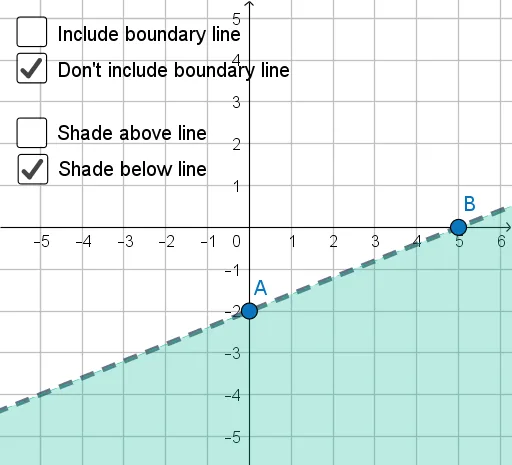
This example demonstrates how to graph a linear inequality by first constructing the boundary line from two points, and then shading the corresponding solution region on the coordinate plane. It focuses on key ideas such as linear functions, straight-line (linear) equations, inequalities, and interpreting the inequality’s solution set as a geometric region. The boundary-line behavior (the distinction between strict vs. non-strict inequality) is handled through the way the line is represented and used to determine which side is included. Construction-wise, the GeoGebra script uses the Line command to create the line, and Simplify to clean up or simplify related expressions/objects. The setup relies on point objects A and B and a collection of auxiliary algebra/display objects (e.g., f, a, b, c, d, g, m, i, e, h, p) plus a text label (text1) to connect calculations with visual output. Suitable for middle/high-school coordinate geometry and algebra instruction, as well as for learners practicing graph-based interpretation of inequalities in GeoGebra.
GeoGebra Commands & Parameters
Line(A, B) → fLine(A, B) → gSimplify(y = (m * x) + i) → p
AI Drawing Prompt Reference
Draw a graph of a linear inequality. First, draw a line connecting two points as the boundary. Then, decide whether to include the line based on the inequality type (strict or non-strict). Next, fill the region on the coordinate plane that satisfies the inequality. Ensure the graph is clear, with key points like A and B, and algebraic expressions such as slope and intercept.
The prompt above was compiled from the original drawing commands and is for reference only.