
Graphing Absolute Value Functions (with Transformations)
Loading the math board and drawing, please wait…
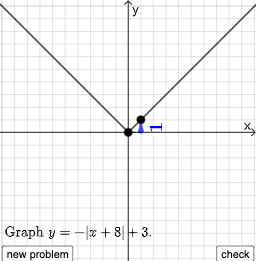
This example demonstrates the graphing of absolute value functions including transformations. Key math concepts involve absolute value functions, function transformations (translations, scalings), linear equations, and piecewise functions. GeoGebra commands like Point, Line, Vector, Polygon, RotateText, Segment, RandomElement, Random, and If are used to construct the graphs and auxiliary elements, with Slider animations to show transformation effects dynamically. Suitable for high school mathematics education to understand the impact of transformations on function graphs.
GeoGebra Commands & Parameters
Point(Segment[(h + 1, y(C) + 10), (h + 1, y(C) - 10)]) → DLine(A, B) → fVector(A, C) → uPolygon(A, C, B) → t1, b, a_1, cRotateText(text2, π / 2) → text3Segment(A, C) → h_{1}Vector(C, D) → vVector((h, 0), A) → wVector((0, 0), (h, 0)) → jRandomElement({-8, -7, -6, -5, -4, -3, -2, -1, 1, 2, 3, 4, 5, 6, 7, 8}) → nRandom(-8, 8) → oRandom(-8, 8) → pIf(h ≟ o, "Horizontal shift is correct!", "Horizontal shift is not correct.") → text9If(n ≟ rise, "Vertical stretch is correct!", "Vertical stretch is not correct.") → text10If(p ≟ y(A), "Vertical shift is correct!", "Vertical shift is not correct.") → text11
AI Drawing Prompt Reference
Draw a graph of an absolute value function with transformations in a coordinate plane, using geometric aids to clarify how the changes affect the shape. First choose key points that define the characteristic vertex and the two end locations of the V-shaped, piecewise structure, then connect the appropriate endpoints with segments to form the reference lines. From the central point, construct vectors toward the endpoints to indicate the transformation directions, and use a polygonal region built from the key points to visually group the upper and lower parts of the graph. Add rotated text near the center to label the parameter orientation. Include on-plot check messages indicating whether the horizontal shift, vertical stretch, and vertical shift match the chosen conditions.
The prompt above was compiled from the original drawing commands and is for reference only.