
Gram-Schmidt Process for Two Vectors
Loading the math board and drawing, please wait…
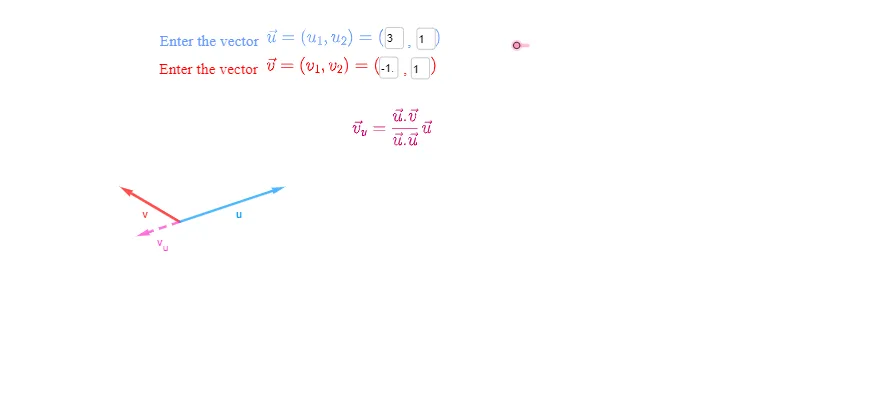
This interactive GeoGebra example demonstrates the Gram-Schmidt orthogonalization process for two vectors in a 2D plane. It visually shows how to transform a set of linearly independent vectors into an orthogonal set by projecting one vector onto another and subtracting the projection. The core mathematical concepts include vector projection, orthogonality, linear independence, and the Gram-Schmidt algorithm. The construction uses GeoGebra commands such as Vector, Point, and Textfield, along with InputBox elements for user-defined vectors. It computes the projection v_u and the residual vector v_{u^⊥}, displaying the orthogonalized result W. This resource is suitable for high school or undergraduate linear algebra courses, helping students grasp the geometric meaning of orthogonalization and vector decomposition. It serves as an effective teaching aid for classroom demonstrations or self-paced learning.
GeoGebra Commands & Parameters
Vector((c, d)) → vPoint(v) → AVector((a, b)) → uTextfield(a) → InputBox1Textfield(b) → InputBox2Textfield(c) → InputBox3Textfield(d) → InputBox4
AI Drawing Prompt Reference
Draw a 2D coordinate plane with two vectors originating from the origin, distinguished by different colors. One vector's endpoint is adjustable via four input boxes, while the other vector is controlled by two additional input boxes. Show the projection of the first vector onto the second vector, and the residual vector from the projection's endpoint to the first vector's endpoint, forming a right angle. Highlight the unit vector in the direction of the residual as the orthogonalized result. Include axes, grid, and vector labels for clarity.
The prompt above was compiled from the original drawing commands and is for reference only.