
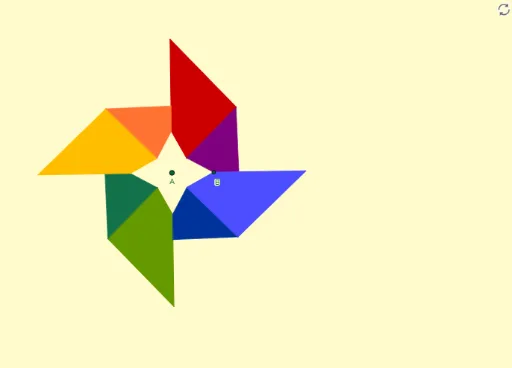
Google Photos Logo Geometric Construction
Loading the math board and drawing, please wait…
This example demonstrates how to construct the geometric shape of the Google Photos Logo using GeoGebra. It involves core mathematical concepts such as circles, vectors, geometric transformations (rotation, reflection), and polygon construction. Key GeoGebra commands and objects used in the construction include Circle, Vector, OrthogonalVector, Line, OrthogonalLine, AngularBisector, Intersect, Midpoint, Polygon, Mirror, and Rotate. It is suitable for high school mathematics education to showcase geometric transformations and construction techniques.
GeoGebra Commands & Parameters
Circle(A, B) → cVector(A, B) → uOrthogonalVector(u) → vLine(A, B) → fOrthogonalLine(A, f) → gAngularBisector(f, g) → h, iIntersect(c, h) → C, DMidpoint(A, D) → EVector(A, D) → wIntersect(c, g) → I, JPolygon(E, J, H, F) → q1, e, j, h_1, f_1Circle(A, G) → dIntersect(d, f) → K, LPolygon(E, B, L, F) → q2, e_1, b, l, f_2Mirror(E, A) → E'Mirror(J, A) → J'Mirror(H, A) → H'Mirror(F, A) → F'Polygon(E', J', H', F') → q1', e', j', h', f'Mirror(E, A) → E'_1Mirror(B, A) → B'Mirror(L, A) → L'Mirror(F, A) → F'_1Polygon(E'_1, B', L', F'_1) → q2', e'_1, b', l', f'_1Rotate(E, 45°, A) → E'_2Rotate(J, 45°, A) → J'_1Rotate(H, 45°, A) → H'_1Rotate(F, 45°, A) → F'_2Rotate(E, 90°, A) → E'_3Rotate(J, 90°, A) → J'_2Rotate(H, 90°, A) → H'_2Rotate(F, 90°, A) → F'_3Polygon(E'_3, J'_2, H'_2, F'_3) → q1'_1, e'_3, j'_2, h'_2, f'_3Rotate(E, 90°, A) → E'_4Rotate(B, 90°, A) → B'_1Rotate(L, 90°, A) → L'_1Rotate(F, 90°, A) → F'_4Polygon(E'_4, B'_1, L'_1, F'_4) → q2'_1, e'_4, b'_1, l'_1, f'_4Mirror(E'_4, A) → MMirror(B'_1, A) → NMirror(L'_1, A) → OMirror(F'_4, A) → PPolygon(M, N, O, P) → q3, m, n, o_1, pMirror(E'_3, A) → QMirror(J'_2, A) → RMirror(H'_2, A) → SMirror(F'_3, A) → TPolygon(Q, R, S, T) → q4, q, r, s, t
AI Drawing Prompt Reference
Draw a complex geometric pattern composed of multiple shapes including circles, vectors, lines, and polygons. Start by creating a circle and then a vector along with its orthogonal vector to construct lines and orthogonal lines. Find intersection points between the circle and lines, calculate midpoints and new vectors. Use these points to build several polygons, then apply mirror and rotation transformations to transform these polygons, and finally combine them into a intricate geometric design showcasing geometric transformations and construction techniques.
The prompt above was compiled from the original drawing commands and is for reference only.