
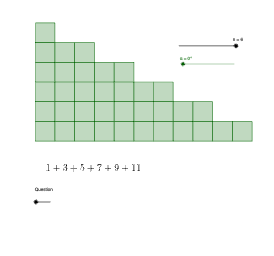
Geometric Visualization of the Sum of First n Odd Numbers
Loading the math board and drawing, please wait…
In collections
Use Cases of GeoGebra
This example visually demonstrates how the sum of the first n odd numbers can be represented through a sequence of geometric constructions and transformations—making the underlying accumulation pattern intuitive. It centers on key ideas from number sequences, especially odd numbers and sequence summation, linking algebraic totals to measurable geometric configurations (e.g., area- or structure-based accumulation). The construction uses GeoGebra commands such as Point (defining key points), Midpoint (creating midpoints), Rotate and Translate (building iterative copies via transformations), Vector (driving placements), Segment and Polygon (forming edges and composite regions), Circle (introducing circular structure), Intersect (computing derived points), and Element (referencing/managing geometric objects). The model relies on many transformed point sets (e.g., primes and indexed variants) to generate successive steps corresponding to n. Suitable for middle and high school math instruction on sequences and summation, as well as interactive GeoGebra lessons that connect algebra with geometry.
GeoGebra Commands & Parameters
Point(yAxis) → CPoint(yAxis) → GPoint(xAxis) → EPoint(yAxis) → PPoint(yAxis) → QMidpoint(A, U) → ZRotate(F, α, Z) → F'Rotate(A, α, Z) → A'Rotate(K, α, Z) → K'Rotate(B, α, Z) → B'Midpoint(L, B) → A_1Rotate(U, α, A_1) → U'Rotate(L, α, A_1) → L'Rotate(J, α, A_1) → J'Rotate(O, α, A_1) → O'Midpoint(B_1, I) → C_1Rotate(T, α, C_1) → T'Rotate(I, α, C_1) → I'Rotate(D_1, α, C_1) → E_1Rotate(M, α, C_1) → M'Midpoint(F_1, W) → G_1Rotate(H, α, G_1) → H'Rotate(S, α, G_1) → S'Rotate(W, α, G_1) → W'Rotate(V, α, G_1) → V'Midpoint(J_1, L_1) → M_1Rotate(H_1, α, M_1) → N_1Rotate(I_1, α, M_1) → O_1Rotate(R, α, M_1) → R'Rotate(L_1, α, M_1) → P_1Point(yAxis) → U_1Polygon(C, A, 4) → poly1, f, g, h, i, D_2, E_2Point(xAxis) → F_2Point(xAxis) → G_2Vector(F_2, G_2) → uVector(F_2, H_2) → vTranslate(poly1, v) → poly1'Translate(poly1', v) → poly1''Translate(poly1'', v) → poly1'''Translate(poly1''', v) → q6Translate(q6, v) → q6'Translate(poly1'', u) → poly1'''_{1}Translate(poly1''', u) → q7Translate(q7, u) → q7'Translate(q6, u) → q6'_{1}Translate(q6'_{1}, u) → q8Translate(q8, u) → q8'Translate(q6', u) → q6''Translate(q6'', u) → q6'''Translate(q6''', u) → q9Translate(q9, u) → q9'Translate(poly1', u) → poly1''_{1}Translate(poly1''_{1}, u) → q10Translate(poly1'''_{1}, u) → q11Translate(q11, u) → q11'Translate(q11', u) → q11''Translate(q7', u) → q7''Translate(q7'', u) → q7'''Translate(q7''', u) → q12Translate(q8', u) → q8''Translate(q8'', u) → q8'''Translate(q12, u) → q12'Translate(q8''', u) → q13Translate(q13, u) → q13'Translate(q13', u) → q13''Translate(q9', u) → q9''Translate(q9'', u) → q9'''Translate(q9''', u) → q14Translate(q14, u) → q14'Translate(q14', u) → q14''Translate(q14'', u) → q14'''Midpoint(F', B') → I_2Polygon(F', I_2, 4) → poly2, j, k, l, m, J_2, K_2Polygon(I_2, B', 4) → poly3, n_{5}, p, q, r, L_2, M_2Midpoint(I', E_1) → N_2Midpoint(I', N_2) → O_2Midpoint(N_2, E_1) → P_2Polygon(I', O_2, 4) → poly4, s, t, a, b, Q_2, R_2Polygon(O_2, N_2, 4) → poly5, c, d, e, f_1, S_2, T_2Polygon(N_2, P_2, 4) → poly6, g_1, h_1, i_1, j_1, U_2, V_2Polygon(P_2, E_1, 4) → poly7, k_1, l_1, m_1, q_1, W_2, Z_2Segment(L', J') → r_1Circle(L', 1) → c_1Circle(L', 2) → d_1Intersect(c_1, r_1, 1) → A_3Intersect(d_1, r_1, 1) → B_3Polygon(L', A_3, 4) → poly8, s_1, t_1, a_1, b_1, C_3, D_3Polygon(A_3, B_3, 4) → poly9, e_1, f_2, g_2, h_2, E_3, F_3Polygon(B_3, J', 4) → poly10, i_2, j_2, k_2, l_2, G_3, H_3Segment(W', S') → m_2Segment(P_1, O_1) → n_2Circle(W', 1) → c_2Circle(W', 2) → d_2Circle(W', 3) → e_2Circle(S', 1) → p_2Intersect(c_2, m_2, 1) → I_3Intersect(d_2, m_2, 1) → J_3Intersect(e_2, m_2, 1) → K_3Intersect(p_2, m_2, 1) → L_3Polygon(W', I_3, 4) → poly11, q_2, r_2, s_2, t_2, M_3, N_3Polygon(I_3, J_3, 4) → poly12, a_2, b_2, f_3, g_3, O_3, P_3Polygon(J_3, K_3, 4) → poly13, h_3, i_3, j_3, k_3, Q_3, R_3Polygon(K_3, L_3, 4) → poly14, l_3, m_3, n_3, p_3, S_3, T_3Polygon(L_3, S', 4) → poly15, q_3, r_3, s_3, t_3, U_3, V_3Circle(P_1, 1) → c_3Circle(P_1, 2) → d_3Circle(P_1, 3) → e_3Circle(O_1, 1) → c_4Circle(O_1, 2) → d_4Intersect(c_3, n_2, 1) → W_3Intersect(d_3, n_2, 1) → Z_3Intersect(e_3, n_2, 1) → A_4Intersect(d_4, n_2, 1) → B_4Intersect(c_4, n_2, 1) → C_4Polygon(P_1, W_3, 4) → poly16, n_1, p_1, a_3, b_3, D_4, E_4Polygon(W_3, Z_3, 4) → poly17, f_4, g_4, h_4, i_4, F_4, G_4Polygon(Z_3, A_4, 4) → poly18, j_4, k_4, l_4, m_4, H_4, I_4Polygon(A_4, B_4, 4) → poly19, n_4, p_4, q_4, r_4, J_4, K_4Polygon(B_4, C_4, 4) → poly20, s_4, t_4, a_4, b_4, L_4, M_4Polygon(C_4, O_1, 4) → poly21, e_4, f_5, g_5, h_5, N_4, O_4Element(l2, n) → l1Element(l2_{1}, n_{6}) → l1_{1}Element(l2_{2}, n_{7}) → l1_{2}
AI Drawing Prompt Reference
In a coordinate plane, first define several reference points on the axes. Use midpoints and rotations around selected pivot points to generate a sequence of closely related vertex sets. From the resulting points, construct a quadrilateral region, then obtain a chain of repeated copies by translating the region along direction vectors determined by pairs of reference points. Apply successive translations to place multiple shifted copies in a row so they form an accumulation-like geometric pattern, visually linking the step-by-step structure with the sum of the first n odd numbers.
The prompt above was compiled from the original drawing commands and is for reference only.