
Geometric Illustration of the Derivative of Vector Functions
Loading the math board and drawing, please wait…
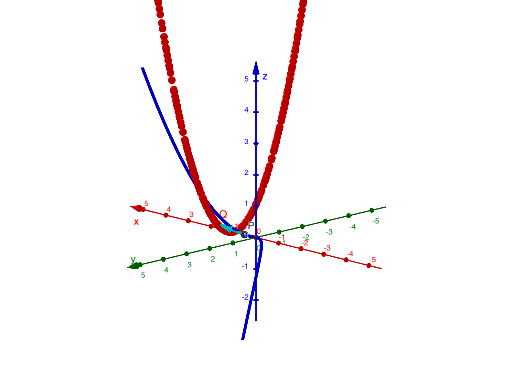
This example visually demonstrates how the derivative of a vector-valued function captures direction and instantaneous rate of change as the parameter t varies. It connects r(t) with its parameter derivative r′(t), highlighting the geometric meaning commonly interpreted via tangential direction and local linear approximation. Key concepts include vector functions, parametric derivatives, and the geometric relationship between points on a curve and constructed vectors. Construction: GeoGebra’s CurveCartesian is used to build the underlying Cartesian curve associated with r, Derivative computes r′ from the vector function, and Vector creates the displayed vector entities (such as r, r′, along with representative objects like t, Q, P, and u) so that the arrows/segments reflect the derivative direction at the corresponding parameter value. Suitable for advanced secondary students and early university calculus/analytic geometry courses, especially for in-class demonstrations and conceptual practice.
GeoGebra Commands & Parameters
CurveCartesian((t, t^(2), t^(3)), t, -10, 10) → rDerivative(r) → r'Vector(P, Q) → u
AI Drawing Prompt Reference
Draw a 3D parametric curve representing the vector function r(t) = (t, t^2, t^3) in the same coordinate system, with t ranging from -10 to 10. Then, at the corresponding point(s) on the curve for a chosen parameter value, construct the derivative vector r′(t), showing the direction and instantaneous rate of change. Display r′(t) visually as a vector segment with an arrow from its base point to its endpoint, aligned with the local linear/tangential direction determined by the curve at that parameter. Emphasize the geometric correspondence between the position on r and the constructed vector r′ at the same parameter, following the order: draw the curve first, then compute/depict the derivative vector, then render it as an arrowed vector.
The prompt above was compiled from the original drawing commands and is for reference only.