
Geometric Distribution and Circle Construction
Loading the math board and drawing, please wait…
In collections
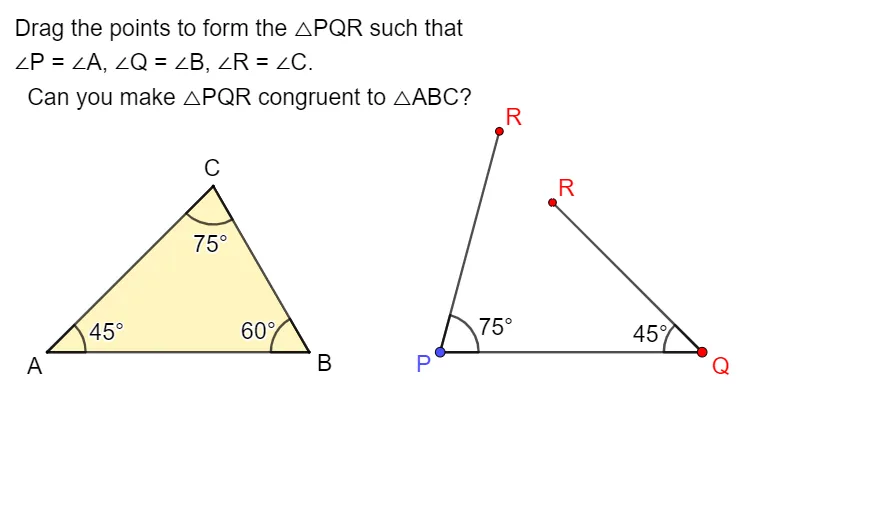
Exploring the Conditions for Congruence of 2 Triangles
This example demonstrates the construction of a circle and the concept of geometric distribution. It involves probability concepts of geometric distribution and properties of circles. Using GeoGebra commands such as Vector, Point, Intersect, Segment, etc., it dynamically shows the interaction between circles and geometric distributions. Suitable for high school mathematics education and learning.
GeoGebra Commands & Parameters
Vector(A, C1) → uPoint(Ray[A + (1, 0), A + (2, 0)]) → BVector(B, C2) → vIntersect(Ray[D, Rotate[D + (1, 0), 45°, D]], Ray[E, Rotate[E - (1, 0), (-(60°)), E]]) → FSegment(F, D) → kSequence((x(A) + (Length[u] * cos(t°)), y(A) + (Length[u] * sin(t°))), t, 0, 355, 5) → VPointsSegment(E, F) → jDynamicCoordinates(C1, x(ClosestPoint[VPoints, C1]), y(ClosestPoint[VPoints, C1])) → CSegment(A, C) → fSegment(A, B) → gSequence((x(B) + (Length[v] * cos(t°)), y(B) + (Length[v] * sin(t°))), t, 0, 355, 5) → UPointsDynamicCoordinates(C2, x(ClosestPoint[UPoints, C2]), y(ClosestPoint[UPoints, C2])) → C'Segment(C', B) → hIntersect(Ray[A, C], Ray[B, C']) → GPolygon({A, B, G}) → t1If(C ≟ G ∧ C' ≟ G, true, false) → closed1Segment(D, E) → iPolygon(D, E, F) → t3, l, m, nAngle(E, D, F) → αAngle(F, E, D) → βAngle(D, F, E) → γAngle(B, A, C) → δAngle(C', B, A) → εAngle(A, C, B) → ζ
AI Drawing Prompt Reference
Draw a dynamic figure combining geometric distribution with circles. Start with two fixed points, extend rays from each, and place a point on each ray. Using these points as centers, generate two sets of points evenly spaced around circles with radii equal to the distances to the other fixed points. Snap each center to the nearest point on its corresponding circle. From each center, draw a ray toward the other, intersecting at a point, forming a triangle with the centers. Construct another triangle from three segments and label its three interior angles. Finally, connect the centers and the intersection point, label relevant angles, and check if the centers coincide with the intersection.
The prompt above was compiled from the original drawing commands and is for reference only.