
Geometric Dimensions Demonstration
Loading the math board and drawing, please wait…
In collections
Folding paper, doing geometry figures
This example demonstrates the construction and analysis of geometric dimension properties using GeoGebra. It involves core mathematical concepts such as polygons, vectors, angles, and geometric transformations. Key GeoGebra commands and objects used include Polygon, Segment, Midpoint, Rotate, CircleArc, Intersect, AngularBisector, OrthogonalLine, Mirror, Circle, Line, and Angle. Suitable for high school mathematics education to understand the construction and properties of two-dimensional figures.
GeoGebra Commands & Parameters
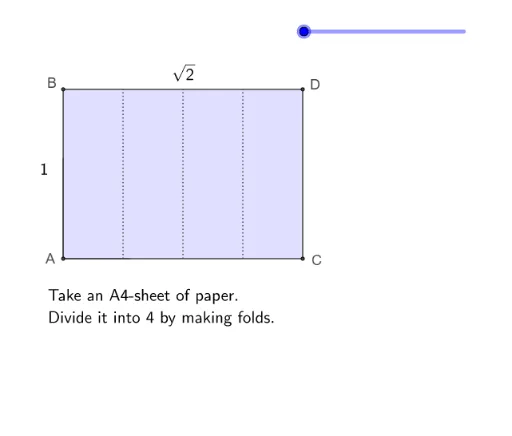
Polygon(A, C, D, B) → vierhoek1, a, c, d, bSegment((sqrt(2) / 4, 0), (sqrt(2) / 4, 1)) → fSegment((sqrt(2) / 2, 0), (sqrt(2) / 2, 1)) → gSegment(((3 * sqrt(2) / 4), 0), ((3 * sqrt(2) / 4), 1)) → hMidpoint(B, D) → ERotate(D, -90°, E) → DDCircleArc(E, DD, D) → eIntersect(e, h, 1) → FCircleArc(E, F, D) → kAngularBisector(F, E, D) → iIntersect(i, c) → GSegment(E, G) → jPolygon(A, C, G, E, B) → veelhoek1, a_1, c_1, g_1, e_1, b_1Polygon(E, D, G) → driehoek1, g_2, e_2, d_1Rotate(E, (((-(s - 1)) * 180))°, g_1) → E'Rotate(D, (((-(s - 1)) * 180))°, g_1) → D'Rotate(G, (((-(s - 1)) * 180))°, g_1) → G'Polygon(E', D', G') → driehoek1', g', e', d'Polygon(E, F, G) → driehoek2, g_3, e_3, f_1Segment(E, D) → lSegment(D, G) → mOrthogonalLine(F, a_1) → nIntersect(j, d') → HHIntersect(j, d') → IIIntersect(n, j) → RIntersect(n, a_1) → SSegment(R, S) → pSegment(F, S) → qMirror(F, g) → HMirror(G, g) → ISegment(I, E) → rCircleArc(E, B, H) → tPolygon(I, E, B) → driehoek3, b_2, i_1, e_4Rotate(I, (((s - 3) * 180))°, r) → I'Rotate(E, (((s - 3) * 180))°, r) → E'_1Rotate(B, (((s - 3) * 180))°, r) → B'Polygon(I', E'_1, B') → driehoek3', b', i', e'_1Polygon(E, I, A, C, G) → veelhoek2, e_5, i_2, a_2, c_2, g_4Segment(B, E) → h_1Segment(B, I) → j_1Mirror(R, g) → TTMirror(S, g) → SSSegment(SS, TT) → k_1Segment(SS, H) → l_1Polygon(I, H, E) → driehoek4, e_6, i_3, h_2Circle(G, C) → p_1Intersect(d', f_1) → JIntersect(d', f_1) → KIntersect(d', f_1) → LIntersect(d', f_1) → MIntersect(p_1, f_1) → N,CircleArc(G, N, C) → q_1Line(G, F) → m_1Intersect(m_1, a_2) → OSegment(O, F) → n_1Polygon(O, C, G) → driehoek5, g_5, o, c_3Rotate(O, (((s - 5) * 180))°, c_3) → O'Rotate(C, (((s - 5) * 180))°, c_3) → C'Rotate(G, (((s - 5) * 180))°, c_3) → G'_1Polygon(O', C', G'_1) → driehoek5', g'_1, o', c'Polygon(I, A, O, G, E) → veelhoek3, i_4, a_3, o_1, g_6, e_7Mirror(O, n_1) → O'_1Mirror(C, n_1) → C'_1Mirror(G, n_1) → G'_2Polygon(O'_1, C'_1, G'_2) → driehoek5'_1, g'_2, o'_1, c'_1Mirror(O, g) → O'_2Mirror(C, g) → C'_2Mirror(G, g) → G'_3Polygon(O'_2, C'_2, G'_3) → driehoek5'_2, g'_3, o'_2, c'_2Rotate(O, (((s - 5) * 180))°, c_3) → O'_3Rotate(G, (((s - 5) * 180))°, c_3) → G'_4Rotate(O'_2, (((-(s - 6)) * 180))°, c'_2) → QRotate(G'_3, (((-(s - 6)) * 180))°, c'_2) → UIntersect(c', o_1) → VIntersect(c', o_1) → WIntersect(c', o_1) → ZLine(I, H) → r_1Intersect(o_1, r_1) → TSegment(O, C) → s_1Segment(C, G) → t_1Polygon(I, A, O, T) → vierhoek2, i_5, a_4, o_2, t_2Rotate(I, (((-(s - 7)) * 180))°, t_2) → I'_1Rotate(A, (((-(s - 7)) * 180))°, t_2) → A'Rotate(O, (((-(s - 7)) * 180))°, t_2) → O'_4Rotate(T, (((-(s - 7)) * 180))°, t_2) → T'Polygon(I, T, G, E) → vierhoek3, i_6, t_3, g_7, e_8Segment(E, T) → f_2Segment(T, E) → j_2Intersect(Segment[O, N], j_2) → A_1Segment(A_1, E) → k_2Rotate(I, (((-(s - 7)) * 180))°, i_6) → I'_2Rotate(A, (((-(s - 7)) * 180))°, i_6) → A'_1Rotate(O, (((-(s - 7)) * 180))°, i_6) → O'_5Rotate(T, (((-(s - 7)) * 180))°, i_6) → T'_1Polygon(I'_2, A'_1, O'_5, T'_1) → vierhoek2', i'_2, a'_1, o'_5, t'_1Mirror(N, g) → NNCircleArc(I, A, NN) → d_2Segment(I, T) → l_2Intersect(g'_2, l_2) → B_1Polygon(N, B_1, T, G) → vierhoek4, n_2, b_3, t_4, g_8Segment(I, A) → m_2Segment(A, O) → p_2Line(E, T) → q_2Line(I, G) → r_2Segment(I, E) → s_2Segment(E, G) → f_3Segment(I, T) → h_3Segment(T, G) → j_3Segment(I, G) → k_3Segment(E, T) → l_3Midpoint(E, T) → D_1Angle(G, D_1, E) → αAngle(I, D_1, T) → βAngle(T, I, E) → ιAngle(E, G, T) → κAngle(I, E, G) → λAngle(G, T, I) → μPolygon(E, D_1, G) → driehoek6, g_9, e_9, d_3Angle(D_1, E, G) → γAngle(G, D_1, E) → δAngle(E, G, D_1) → εAngle(G, E, D) → ζ
AI Drawing Prompt Reference
Draw a quadrilateral and two perpendicular line segments, then find their intersection point. Create an arc connecting two vertices of the quadrilateral centered at this point. Find the intersection of this arc with another line segment and draw a new arc centered at this point. Draw an angle bisector and locate its intersection with one side of the quadrilateral. Connect this intersection to a vertex to form a new pentagon. Rotate a triangle centered at the intersection point and reflect it. Finally, connect the rotated and reflected points to complete the complex shape.
The prompt above was compiled from the original drawing commands and is for reference only.