
Geometric Construction with Circles and Reflection Revealing Fractional Relation
Loading the math board and drawing, please wait…
In collections
Poorly Drawn Parallelograms 3
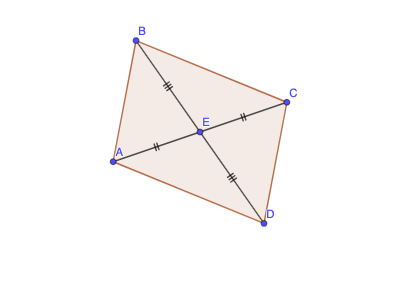
This GeoGebra example demonstrates how circle-based geometry combined with mirror (reflection) symmetry and polygon/segment connections can visualize a fractional or ratio-like relationship within a constructed figure. The key math ideas include geometric construction (constructing a circle, forming polygons and segments) and a transformation viewpoint via reflection (Mirror) to produce corresponding points and segments. Construction highlights: it uses the Circle command to create the base circle, Mirror to obtain reflected (corresponding) objects from original points, and Polygon/Segment to connect key vertices into the resulting boundary and internal structure. The diagram is assembled from characteristic points listed in the construct summary (e.g., E, A, B, C, D and their derived or reflected versions such as b′, c′), along with labeled auxiliary objects (c, d, q1, b, c_1, f, g, h, i) to keep the configuration consistent. Suitable for secondary school geometry lessons and interactive demonstrations on transformations and ratio-style relationships in visual mathematics.
GeoGebra Commands & Parameters
Circle(E, A) → cCircle(E, B) → dMirror(A, E) → CMirror(B, E) → DPolygon(A, B, C, D) → q1, b, c_1, b', c'Segment(B, E) → fSegment(E, C) → gSegment(E, D) → hSegment(E, A) → i
AI Drawing Prompt Reference
On a plane, choose a common center point E and two points A and B. Draw one circle centered at E passing through A, and a second circle centered at E passing through B. Reflect point A across the line through A and E to obtain point C, and reflect point B across the line through B and E to obtain point D. Connect A, B, C, and D in order to form a polygon highlighting the main boundary. Then add line segments linking the key center E to each of A, B, C, and D (B–E, E–C, E–D, and E–A) to emphasize the mirror-related structure.
The prompt above was compiled from the original drawing commands and is for reference only.