
Geometric Construction to Divide a Segment into Equal Parts
Loading the math board and drawing, please wait…
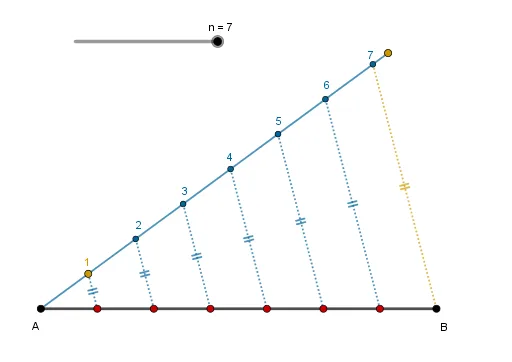
This example demonstrates a precise geometric construction for dividing a given segment into n equal parts along a straight line. It helps learners see how equal partition points can be generated systematically and then connected to related ideas such as midpoints/median-line reasoning in plane figures. Key concepts include segment bisection and n-division (equidistant partition), using rays and lines to define the working direction, and determining required points via intersections. Construction highlights derived from the provided GeoGebra summary: Point (creating key vertices), Segment (defining the original segment), Circle (used as an auxiliary construction tool to locate points through distance/intersection control), Ray (setting up the partition direction), Intersect (computing intersection points that become the division marks), and Line (building supporting lines that guide the construction). The listed objects include endpoints (A, B), a parameter n, and multiple intermediate points (C, D, E, …) culminating in the set of division points, illustrating an intersection-based workflow for equal subdivision. Suitable for middle school to high school geometry instruction and for teaching step-by-step geometric construction techniques.
GeoGebra Commands & Parameters
Point(f) → BSegment(A, B) → gCircle(A, N) → d_1Point(d_1) → CRay(A, C) → hPoint(h) → KSegment(C, A) → iPoint(h) → DSegment(C, A) → kSegment(D, K) → jPoint(j) → ECircle(E, A) → cIntersect(c, k, 2) → FCircle(F, Radius[c]) → dIntersect(d, k, 1) → GCircle(G, Radius[d]) → eIntersect(e, k, 1) → HCircle(H, Radius[e]) → pIntersect(p, k, 1) → ICircle(I, Radius[p]) → qIntersect(q, k, 1) → JCircle(J, Radius[q]) → rIntersect(r, k, 1) → LSegment(L, B) → lSegment(J, B) → mSegment(I, B) → sSegment(H, B) → tSegment(G, B) → aSegment(F, B) → bLine(J, l) → f_1Line(I, f_1) → g_1Line(H, g_1) → h_1Line(G, h_1) → i_1Line(F, i_1) → j_1Line(E, j_1) → k_1Intersect(k_1, g) → MSegment(E, M) → l_1Intersect(j_1, g) → OSegment(O, F) → m_1Intersect(i_1, g) → PSegment(G, P) → n_1Intersect(h_1, g) → QSegment(H, Q) → p_1Intersect(g_1, g) → RSegment(I, R) → q_1Intersect(f_1, g) → SSegment(J, S) → r_1Line(I, m) → s_1Line(H, s_1) → t_1Line(G, t_1) → a_1Line(F, a_1) → b_1Line(E, b_1) → c_1Intersect(c_1, g) → TIntersect(b_1, g) → UIntersect(a_1, g) → VIntersect(t_1, g) → WIntersect(s_1, g) → ZSegment(I, Z) → e_1Segment(W, H) → f_2Segment(G, V) → g_2Segment(U, F) → h_2Segment(E, T) → i_2Line(H, s) → j_2Line(G, j_2) → k_2Line(F, k_2) → l_2Line(E, l_2) → m_2Intersect(m_2, g) → A_1Intersect(l_2, g) → B_1Intersect(k_2, g) → C_1Intersect(j_2, g) → D_1Segment(H, D_1) → n_2Segment(C_1, G) → p_2Segment(F, B_1) → q_2Segment(A_1, E) → r_2Line(G, t) → s_2Line(F, s_2) → t_2Line(E, t_2) → a_2Intersect(s_2, g) → E_1Segment(E_1, G) → b_2Intersect(t_2, g) → F_1Segment(F_1, F) → c_2Intersect(a_2, g) → G_1Segment(G_1, E) → d_2Line(F, a) → e_2Line(E, e_2) → f_3Intersect(f_3, g) → H_1Segment(E, H_1) → g_3Intersect(e_2, g) → I_1Segment(I_1, F) → h_3Line(E, b) → i_3Intersect(i_3, g) → J_1Segment(E, J_1) → j_3
AI Drawing Prompt Reference
Draw a line segment and divide it into n equal parts. Start by marking the endpoints of the segment. Then, draw a circle centered at one endpoint and find a point on the circle. Connect this point to the endpoint to create a ray. Use the circle and ray to find points along the segment by intersecting them. Connect these points to the endpoints. Finally, draw lines through these points to show the division and geometric relationships.
The prompt above was compiled from the original drawing commands and is for reference only.