
Geometric Construction of Square Roots of Integers
Loading the math board and drawing, please wait…
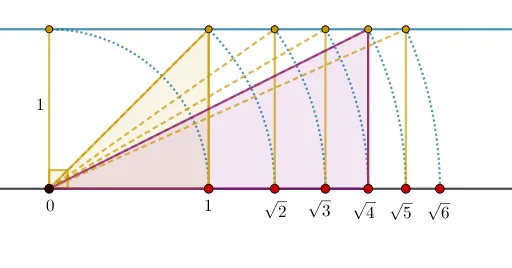
This GeoGebra example demonstrates a geometric construction for visualizing the square roots of integers. By leveraging the relationship between the hypotenuse and legs of right triangles, it represents √n (where n is an integer) as a segment length, using circles, arcs, and intersections to turn abstract square roots into tangible geometric figures. The core mathematical concepts include square roots, right triangles, the Pythagorean theorem, circle-arc intersections, and segment ratios. The construction employs GeoGebra commands such as Point, Segment, OrthogonalLine, CircleArc, Intersect, Angle, Vector, Translate, Circle, and Polygon, building a complex diagram with auxiliary points, segments, arcs, and angles, and using translations or rotations to create symmetric or recursive patterns. This example is suitable for middle or high school students learning about square roots, geometric construction, and the integration of algebra with geometry. It serves as an excellent tool for classroom demonstrations or self-exploration, helping learners grasp the geometric meaning of irrational numbers and their placement on the number line.
GeoGebra Commands & Parameters
Point(f) → BSegment(A, B) → gOrthogonalLine(A, f) → hPoint(h) → CCircleArc(A, B, C) → cIntersect(c, h, 1) → DSegment(D, A) → jAngle(B, A, D) → αOrthogonalLine(D, h) → iVector(A, B) → uTranslate(D, u) → D'Translate(A, u) → A'Segment(D', A') → j'Segment(A, D') → kCircle(A, D') → dPolygon(D', B, A) → t1, a_1, d', b_1Intersect(d, f, 2) → ECircleArc(A, E, D') → eVector(A, E) → vTranslate(D, v) → D'_{1}Translate(A, v) → A'_{1}Segment(D'_{1}, A'_{1}) → j'_{1}Segment(A, D'_{1}) → lCircle(A, D'_{1}) → pIntersect(p, f, 2) → FCircleArc(A, F, D'_{1}) → qVector(A, F) → wTranslate(D, w) → D'_{2}Translate(A, w) → A'_{2}Segment(D'_{2}, A'_{2}) → j'_{2}Segment(A, D'_{2}) → mCircle(A, D'_{2}) → rIntersect(r, f, 2) → GCircleArc(A, G, D'_{2}) → sVector(A, G) → aTranslate(D, a) → D'_{3}Translate(A, a) → A'_{3}Segment(D'_{3}, A'_{3}) → j'_{3}Segment(A, D'_{3}) → nPolygon(D'_{3}, A, G) → t2, g_1, d'_{3}, a_2Circle(A, D'_{3}) → tIntersect(t, f, 2) → HCircleArc(A, H, D'_{3}) → c_1Vector(A, H) → bTranslate(D, b) → D'_{4}Translate(A, b) → A'_{4}Segment(D'_{4}, A'_{4}) → j'_{4}Segment(A, D'_{4}) → f_1Circle(A, D'_{4}) → d_1Intersect(d_1, f, 2) → ICircleArc(A, I, D'_{4}) → e_1
AI Drawing Prompt Reference
Create a geometric construction diagram: place a baseline line with points A and B, draw the segment between them, and through A draw an auxiliary line perpendicular to this baseline. On the perpendicular line mark point C, then draw a circular arc centered at A passing through B and C, intersect it with the perpendicular to obtain point D, and connect A to D. Through D construct a line orthogonal to the same perpendicular. Next, using circles centered at A through D and through subsequent shifted positions of D, intersect these circles with the baseline to get points E, F, G, and H, and draw arcs with endpoints at A and those intersection points combined with the corresponding shifted points. For each step, use the direction from A to the new intersection point to translate the point D accordingly, draw the translated segment between the translated D and translated A, and connect A to each translated D. Finally, form polygons using the key translated points together with B, A, and/or the point linked to G to show a recursive pattern for square-root style lengths.
The prompt above was compiled from the original drawing commands and is for reference only.