
Geometric Visualization of Multiplicative Effects via Circle Sectors
Loading the math board and drawing, please wait…
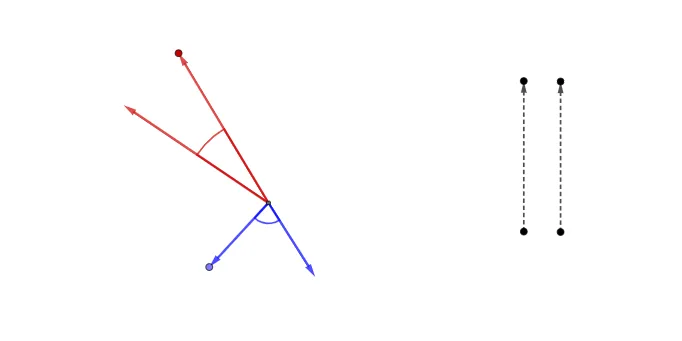
This example visualizes how a “multiplicative” relationship can be represented geometrically on circles by linking changing scale factors to corresponding rotations/angles and reflected positions. It highlights angle-based structure on circle sectors, making abstract multiplication effects easier to see. Key concepts include circle geometry (circle and sector construction), geometric transformations (reflection/rotation behavior), and the intuition behind logarithmic or step-function-style mappings that turn proportional changes into discrete or piecewise visual steps. Construction-wise, the model relies on GeoGebra commands Vector, Circle, Point, Rotate, Angle, and CircleSector: points (e.g., B, C, D, F, and others in the build list) define the base geometry; Circle and Point establish the circular reference frame; Vector and Rotate create the transformation that encodes the multiplicative effect; Angle extracts the governing angular relationships; and CircleSector draws the sector regions that convey the step/piecewise behavior. Suitable for secondary to early university learning, classroom demonstrations, and geometry-to-function conceptual bridging.
GeoGebra Commands & Parameters
Vector(D, F) → eCircle(E, 4) → dPoint(d) → HVector(E, H) → wVector(I, J) → bRotate(H, 25°, E) → H'Angle(H, E, H') → αVector(E, H') → uCircle(E, 2) → cPoint(c) → AVector(E, A) → vRotate(A, 75°, E) → A'Angle(A, E, A') → βVector(E, A') → aPoint(w) → GPoint(u) → KCircleSector(E, G, K) → f
AI Drawing Prompt Reference
Draw a geometric figure consisting of circles and sectors. The figure has a central circle with two points on its circumference. These points are connected through rotations and reflections to form sector regions. A central point and a rotated point are linked via angular relationships. The overall structure illustrates the relationship between angles and area changes, suitable for geometric teaching and conceptual bridging to functions.
The prompt above was compiled from the original drawing commands and is for reference only.