
Intersection of a Hyperboloid and a Cylinder
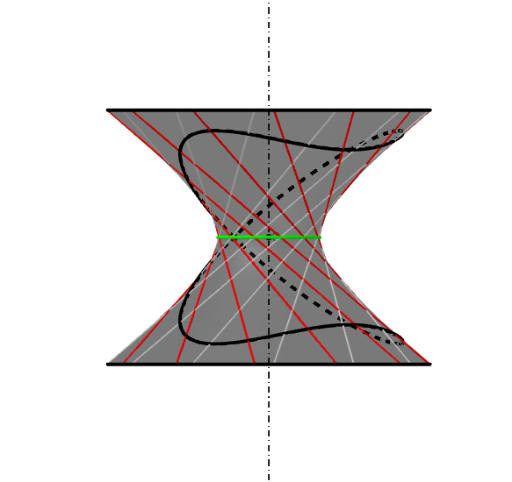
Loading the math board and drawing, please wait…
This example demonstrates the intersection of a hyperboloid and a cylinder. Key mathematical concepts include solid geometry and coordinate geometry. Using commands like Surface, CurveCartesian, and Rotate in GeoGebra, the intersection can be constructed. Suitable for high school mathematics education and learning.
GeoGebra Commands & Parameters
Surface((a * cos(v)) - ((a * u) * sin(v)), (a * sin(v)) + ((a * u) * cos(v)), (c * u), u, (-b), t, v, 0°, β) → gCurveCartesian((a * sqrt(1 + u^(2))), ((a * sqrt(1 + u^(2))) * 0), (c * u), u, (-b), t) → iCurveCartesian(a - ((a * u) * 0), (a * 0) + (a * u), (c * u), u, (-b), t) → jOrthogonalLine(O, xOyPlane) → hSequence(Rotate[j, (i * 30°), zAxis], i, 0, β / (30°), 1) → l2Sequence(Rotate[i, (k * 30°), zAxis], k, 0, α / (30°), 1) → l3CurveCartesian(((a * sqrt(1 + t^(2))) * cos(v)), ((a * sqrt(1 + t^(2))) * sin(v)), (c * t), v, 0°, α) → kCurveCartesian((a * cos(β)) - ((a * u) * sin(β)), (a * sin(β)) + ((a * u) * cos(β)), (c * u), u, (-b), t) → eSurface(((a * sqrt(1 + u^(2))) * cos(v)), ((a * sqrt(1 + u^(2))) * sin(v)), (c * u), u, (-b), t, v, 0°, α) → dCurveCartesian(((a * sqrt(1 + b^(2))) * cos(v)), ((a * sqrt(1 + b^(2))) * sin(v)), (c * (-b)), v, 0°, α) → lSequence(CurveCartesian[(a * cos((i * 30°))) - ((a * u) * sin((i * 30°))), ((-a) * sin((i * 30°))) - ((a * u) * cos((i * 30°))), (c * u), u, (-b), t], i, 0, β / (30°), 1) → l1CurveCartesian(((a * sqrt(1 + u^(2))) * cos(α)), ((a * sqrt(1 + u^(2))) * sin(α)), (c * u), u, (-b), t) → fCircle(O, a, xOyPlane) → pCurveCartesian((((-a) * u) * 0), (a * u), (c * u), u, (-b), t) → a_1CurveCartesian((((-a) * u) * sin(β)), ((a * u) * cos(β)), (c * u), u, (-b), t) → wRotate(a_1, 90°, h) → b_1Rotate(b_1, α, h) → c_1Surface((((-a) * u) * sin(v)), ((a * u) * cos(v)), (c * u), u, (-b), t, v, 0°, 360°) → g_1CurveCartesian((((-a) * t) * sin(v)), ((a * t) * cos(v)), (c * t), v, 0°, 360°) → h_1CurveCartesian((((-a) * (-b)) * sin(v)), ((a * (-b)) * cos(v)), (c * (-b)), v, 0°, 360°) → i_1Point(xAxis) → AOrthogonalPlane(A, xAxis) → p_1Intersect(yAxis, p, 2) → BLine(B, xAxis) → k_1Intersect(k_1, p_1) → CLine(C, A) → l_1Point(l_1) → DOrthogonalLine(D, p_1) → m_1Circle(m_1, C) → q_1Cylinder(q_1, -37.694964153002026) → n_1, r_1, o_1Point(k) → ELine(E, h) → s_1Intersect(s_1, xOyPlane) → FVector(F, E) → u_1Translate(B, u_1) → B'Circle(h, B') → t_1Tangent(E, t_1) → f_2, g_2Circle(h, E) → c_2Intersect(f_2, c_2, 1) → GVector(E, F) → v_1Translate(G, v_1) → G'Translate(G', v_1) → G''Segment(E, G'') → h_2Intersect(h_2, o_1) → H, ILocus(H, E) → ponthalmaz1Locus(I, E) → ponthalmaz2
AI Drawing Prompt Reference
Construct the intersection of a hyperboloid with a cylinder in 3D. Set a spatial reference with a chosen center and axes, then build a base parametric curve on the hyperboloid and obtain the hyperboloid surface through rotational symmetry. Construct the cylinder surface using a circular cross-section and the cylinder axis, then find and display the curve formed by intersecting the two surfaces. Select points on the intersection, connect them with a line, and use circle and tangent relationships on the relevant circular cross-sections. Finally, translate the key intersection-derived points along a determined direction and draw the resulting segment and two loci (point sets) defined with respect to the translated/anchor points.
The prompt above was compiled from the original drawing commands and is for reference only.