
Geometric Construction of the Ubuntu Logo
Loading the math board and drawing, please wait…
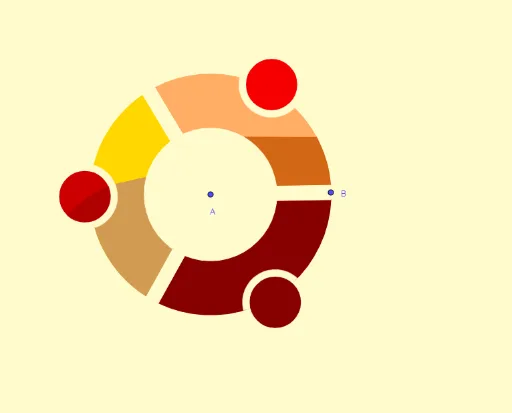
① This GeoGebra example demonstrates how to construct the circular Ubuntu logo using precise geometric construction and transformation tools, showing the application of mathematics in brand design. ② Core mathematical concepts include circles, circular arcs, polygons, vectors, orthogonal vectors, reflection (axial symmetry), rotation, intersection points, as well as derivatives and logarithmic functions, covering 2D geometry, vector operations, and basic differential calculus. ③ Construction highlights: from the summary, commands such as Line, Vector, Circle, OrthogonalVector, Mirror, Intersect, Rotate, CircleSector, Polygon, and CircleArc are used, along with multiple points, lines, circles, and text objects, to generate the complex logo outline through symmetry and rotation. ④ Suitable for upper secondary to early university students, this example helps understand geometric transformations, vector properties, and the integration of function graphs with geometric construction, and serves as an engaging cross-disciplinary case for mathematics and design.
GeoGebra Commands & Parameters
Line(A, B) → fVector(A, B) → uCircle(A, B) → cCircle(A, C) → dOrthogonalVector(u) → vLine(D, f) → gMirror(g, f) → g'Intersect(d, g) → E, FIntersect(c, g) → G, HRotate(F, (-(120°)), A) → F'Rotate(F', (-(120°)), A) → F''Rotate(H, (-(120°)), A) → H'Rotate(H', (-(120°)), A) → H''Mirror(F, f) → F'_1Mirror(H, f) → H'_1Rotate(F'_1, (-(120°)), A) → IRotate(H'_1, (-(120°)), A) → JRotate(I, (-(120°)), A) → I'Rotate(J, (-(120°)), A) → J'Rotate(C, 60°, A) → C'Rotate(C', 120°, A) → C''Rotate(C'', 120°, A) → C'''CircleSector(A, H, J') → eCircleSector(A, H'', J) → hCircleSector(A, H', H'_1) → kLine(A, C') → iPolygon(F, H, H'_1, F'_1) → c1, f_1, h_1, h'_1, f'_1Rotate(F, 120°, A) → F'_2Rotate(H, 120°, A) → H'_2Rotate(H'_1, 120°, A) → KRotate(F'_1, 120°, A) → LPolygon(F'_2, H'_2, K, L) → c1', f'_2, h'_2, k_1, lRotate(F'_2, 120°, A) → MRotate(H'_2, 120°, A) → NRotate(K, 120°, A) → K'Rotate(L, 120°, A) → L'Polygon(M, N, K', L') → c1'', m, n, k', l'Rotate(B, 45°, A) → B'Rotate(B', 120°, A) → B''Rotate(B'', 120°, A) → B'''Mirror(B', i) → B''_1Rotate(B''_1, 120°, A) → ORotate(O, 120°, A) → O'Vector(A, C') → wCircle(Q, R) → qRotate(q, 120°, A) → q'Rotate(q', 120°, A) → q''CircleSector(Q, B''_1, B') → rRotate(r, 120°, A) → r'Rotate(r', 120°, A) → r''Line(A, C''') → jVector(A, C''') → aCircle(P, C') → pIntersect(p, c) → S, T, ,Intersect(p, i) → U, VCircle(N, D) → sIntersect(s, q') → W, Z, ,Intersect(s, d) → A_1, B_1, ,Intersect(d, j) → C_1, D_1Intersect(s, r') → E_1, , ,Rotate(Q, 120°, A) → Q'CircleArc(N, Z, W) → tCircleArc(Q', W, Z) → c_1Polygon(C', T, H, F) → c2, c', t_1, h_2, f_2CircleArc(A, H, T) → e_1Polygon(E_1, O, J, I, A_1) → polígono1, b, o_1, j_1, i_1, a_1CircleArc(A, O, J) → g_1
AI Drawing Prompt Reference
Start with a common center point, draw two concentric circles and a line through the center with a perpendicular vector. Use reflection and rotation to generate multiple intersection points on the circles, then connect these points to form three symmetric quadrilateral petals. From the center, add circular arcs linking key points between petals to create three sector gaps. Finally, place a small circle near the center and several rotated arcs, resulting in a threefold symmetric circular emblem outline.
The prompt above was compiled from the original drawing commands and is for reference only.