
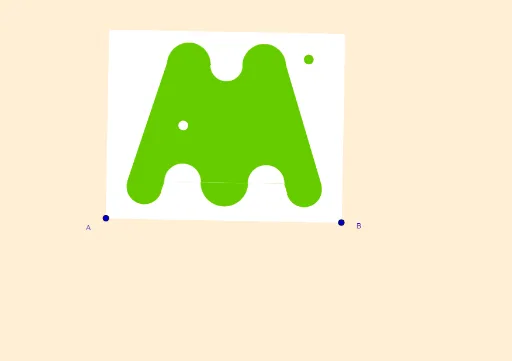
Geometric Construction of the ARAMÓN Ski Logo (Aragón, Spain)
Loading the math board and drawing, please wait…
① This GeoGebra example reconstructs the logo of ARAMÓN, a ski brand from Aragón, Spain, demonstrating how a real-world graphic can be turned into an editable mathematical construction. ② Core mathematical concepts include two-dimensional vectors, midpoints, perpendicular lines, angle bisectors, mirror symmetry, polygons, semicircles, and circle translation, all rooted in plane geometry and transformations. ③ Construction highlights: from the summary, the commands used are Line, OrthogonalLine, Vector, OrthogonalVector, Midpoint, LineBisector, Intersect, Mirror, Polygon, Semicircle, Circle, and Translate, with objects such as points A, B, S, S', p', n', I', and many auxiliary lines and circles that together form the logo's symmetric and curved elements. ④ This is suitable for upper secondary or early university geometry courses, and also for teaching mathematical modeling in brand design, showing how geometric transformations apply to real graphic creation.
GeoGebra Commands & Parameters
Line(A, B) → sOrthogonalLine(A, s) → bVector(A, B) → uOrthogonalVector(u) → vMidpoint(A_1, A) → JLineBisector(A, B) → mOrthogonalLine(J, m) → iOrthogonalLine(K, i) → lOrthogonalLine(G, l) → pOrthogonalLine(L, b) → aIntersect(m, a) → SMirror(S, m) → S'Mirror(p, i) → p'OrthogonalLine(F, l) → nMirror(n, i) → n'Intersect(m, n') → DLineBisector(E, D) → jOrthogonalLine(E, n') → fIntersect(f, p') → HLineBisector(E, H) → hMirror(I, f) → I'Line(L, I') → kOrthogonalLine(A_1, b) → rMirror(l, m) → l'OrthogonalLine(B, u, xOyPlane) → gIntersect(l, n) → QMirror(J, m) → J'Intersect(g, r) → CPolygon(A_1, C, B, A) → q1, a_1, c, b_1, a_2Mirror(I, m) → I'_1Semicircle(I', I) → dSemicircle(I'_1, I) → eLine(N, k) → qOrthogonalLine(L, q) → tIntersect(q, t) → MSemicircle(M, L) → c_1Intersect(m, n) → OMirror(R, m) → R'Semicircle(R', R) → d_1Intersect(a, q) → PSemicircle(P, R) → e_1Polygon(L, M, N, E, I') → poly1, l_1, m_1, n_1, e_2, i'Intersect(e, m) → T,Intersect(f, h) → UPolygon(P, S, T, I, U, N) → poly2, p_1, s_1, t_1, i_1, u_1, n_2Mirror(L, m) → L'Mirror(M, m) → M'Mirror(N, m) → N'Mirror(E, m) → E'Mirror(I', m) → I''Polygon(L', M', N', E', I'') → poly1', f_1, m', g_1, e', i''Mirror(d, m) → d'Mirror(c_1, m) → h_1Mirror(P, m) → P'Mirror(T, m) → T'Mirror(I, m) → I'_2Mirror(U, m) → U'Mirror(N, m) → N'_1Polygon(P', S', T', I'_2, U', N'_1) → poly2', j_1, s', t', i'_2, u', n'_1Mirror(e_1, m) → k_1Intersect(i, q) → VIntersect(f, i) → WCircle(V, W) → q_1Vector(W, C) → wTranslate(q_1, Vector[(0.8 * w) - (0.03 * v)]) → r_1
AI Drawing Prompt Reference
Draw a symmetric geometric logo composed of lines, perpendiculars, angle bisectors, mirror symmetry, polygons, semicircles, and circles. Start with a horizontal baseline, construct a perpendicular at one endpoint, and define midpoints and orthogonal vectors. Use angle bisectors and perpendiculars to find intersection points, then mirror them across the central axis. Connect key points to form two polygons, add semicircles between specific points, and mirror remaining elements to complete the balanced design.
The prompt above was compiled from the original drawing commands and is for reference only.