
Geometric Construction of Sine and Cosine Curves
Loading the math board and drawing, please wait…
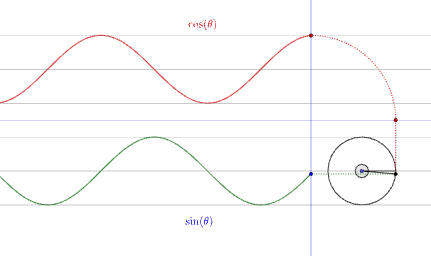
This example demonstrates sine and cosine curves by using a rotating point on a circle and projecting it onto reference lines. It highlights the geometric meaning of trigonometric functions: how a rotation angle determines the y- and x-projections, producing sinusoidal wave shapes and their phase relationship. Key concepts include trigonometry (sine and cosine), circular motion/parameterization, angle-to-function correspondence, and periodic behavior as the rotation changes. Construction outline: Circle and Point set up the reference circle and key points; Rotate drives the moving point around the circle; OrthogonalLine creates perpendicular projections from the rotating point; Intersect locates key intersection points; Line and Segment connect and define the relevant geometric pieces; Angle labels the rotation angle (e.g., α, β) to relate phase to the curves; CircleArc and text objects (text1/text2) visualize arcs and annotations. Suitable for secondary to early university education, especially for building intuitive understanding of trig functions and graphing sinusoidal functions.
GeoGebra Commands & Parameters
Circle(A, 1) → cPoint(c) → BRotate(B, α, A) → B'OrthogonalLine(B', xAxis) → fIntersect(f, xAxis) → CIntersect(xAxis, yAxis) → DCircle(D, C) → dIntersect(d, yAxis, 2) → ELine(B', xAxis) → gIntersect(g, yAxis) → FSegment(C, B') → hSegment(B', F) → iCircleArc(D, C, E) → eAngle(B, A, B') → βSegment(B', A) → jSegment(A, B) → kIntersect(xAxis, yAxis) → GPoint(yAxis) → HLine(G, H) → lPoint(xAxis) → IPoint(xAxis) → JLine(I, J) → m
AI Drawing Prompt Reference
Construct a geometric demonstration of sine and cosine curves using a rotating point on a unit circle. Draw a reference circle with its center, then place a point on the circle that rotates around the center at a specified angle. From the rotating point, drop a perpendicular to the horizontal axis and draw a horizontal line to the vertical axis, creating right triangles that represent the cosine and sine values. Label the rotation angle and draw an arc showing the rotation. Include auxiliary lines and a secondary circle at the axis intersection to illustrate how the rotation angle corresponds to the horizontal and vertical projections, visualizing the relationship between circular motion and trigonometric functions.
The prompt above was compiled from the original drawing commands and is for reference only.