
Geometric construction of RMS current for a sinusoidal waveform
Loading the math board and drawing, please wait…
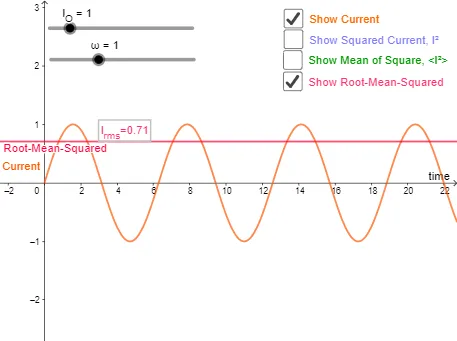
This example demonstrates how to construct the root-mean-squared (RMS) current Irms from a sinusoidal current waveform and visualize what RMS means in an intuitive geometric way. The key math concepts include sinusoidal functions, angular frequency and period (omega and T), the RMS definition (square, average over a period, then take the square root), and the relationship to inequality/means ideas (connected to geometric-mean style intuition). Construction-wise, the GeoGebra setup uses objects such as omega, T, I_O, a time variable t, the function f (the sinusoidal current), and the computed value Irms. Auxiliary quantities (e.g., c, d, e, p, h, a, b, c_1) support drawing the equivalent “RMS level” and marking cycle segmentation or geometric proxies for the averaging process, while text1 labels the main result. Suitable for advanced high-school through early university learners, especially for lessons on graphing trigonometric functions, modeling simple AC signals, and introducing RMS as a standard engineering/statistical quantity.
GeoGebra Commands & Parameters
Numeric omega(1)(2 * π / omega)Numeric I_O(1)f(x) = If[x ≥ 0, (I_O * sin((omega * x)))]g(x) = f(x)^(2)Boolean b(false)Numeric c_1(0)Integral[g, 0, (2 * π)] / ((2 * π))h(x) = Integral[g(x), 0, T] / Tp(x) = sqrt(h(x))0Boolean c(true)Boolean d(false)Boolean e(false)Boolean i(true)p(0)
AI Drawing Prompt Reference
Draw a sinusoidal current waveform with time on the horizontal axis and current on the vertical axis. Include sliders for angular frequency and peak current, and show the period length. Plot the square of the current curve, then average this squared curve over one period to get the mean value, and take its square root to obtain the RMS value. Mark the RMS level with a horizontal line, and indicate one period interval on the time axis with shading or auxiliary lines to illustrate the squaring, averaging, and square-root steps. Add a text label showing the computed RMS value.
The prompt above was compiled from the original drawing commands and is for reference only.