
Geometric Construction of Cube Face Areas
Loading the math board and drawing, please wait…
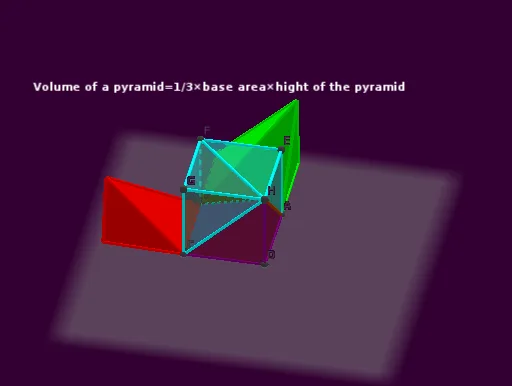
This example demonstrates how to construct and display cube-related faces (including visible side faces and base face) and associate them with clear geometric boundaries and area-focused labeling. The key mathematical ideas are solid geometry (the cube and its face/edge structure), relationships between faces and edges, and vector-based geometric construction concepts for directions and intermediate construction points. Construction workflow: Cube and Pyramid are used to generate the 3D solid structure; Line creates key boundary segments; Rotate helps reposition faces/edges to obtain the desired view or configuration; Intersect computes precise intersection points that define where faces meet; TableText is then used to annotate face/area information. Named objects such as faceABCD, faceABCD_1, faceABFE_1, faceBCGF, and many edges like edgeAB_1, edgeCD, edgeAH_1 support a structured depiction of face patches and their enclosing edges. Suitable for upper secondary and early university geometry lessons, especially for teaching/learning spatial geometry, visualization of areas on solids, and hands-on practice with GeoGebra construction techniques.
GeoGebra Commands & Parameters
Cube(A, B, C) → a, D, faceCDHG, faceEFGH, edgeAD_1, edgeAB_1, edgeBC_1, edgeCD_1, edgeAE_1, edgeDH_1, edgeEH_1, edgeEF_1, E, edgeBF_1, edgeFG_1, edgeCG_1, edgeGH_1, F, G, H, faceABCD_1, faceADHE, faceABFE_1, faceBCGFPyramid(A, B, C, D, H) → b, faceABCD, edgeAH_1, edgeBH_1, edgeCH_1, edgeDH, faceABH_1, faceBCH, faceCDH, faceADH, edgeAB_2, edgeBC, edgeCD, edgeADTableText({{LaTeX[faceABH_1, true, true]}, {LaTeX[faceADH, true, true]}, {LaTeX[faceBCH, true, true]}, {LaTeX[faceCDH, true, true]}}) → text1Pyramid(B, F, E, A, H) → c, faceABFE, edgeBH_2, edgeFH_1, edgeEH, edgeAH, faceBFH_1, faceEFH, faceAEH, faceABH, edgeBF_2, edgeEF, edgeAE, edgeABLine(A, B) → fRotate(c, slade, f) → c'Intersect(yAxis, edgeBC) → IIntersect(yAxis, edgeBC) → JPyramid(C, I, J, B, F, G, H) → d, faceBFGCIJ, edgeBJ, edgeBF, edgeFG, edgeCG, edgeCH, edgeHI, edgeHJ, edgeBH, edgeFH, edgeGH, faceCHI, faceHIJ, faceBHJ, faceBFH, faceFGH, faceCGH, edgeCI, edgeIJLine(B, C) → gRotate(d, slade, g) → d'
AI Drawing Prompt Reference
Construct a 3D perspective drawing of a cube, emphasizing the visible side faces and the base face. First create the cube solid with its key vertices and edges, then form pyramid structures connected to the cube’s corresponding points so that faces/edges can be repositioned into a chosen viewing configuration. Use intersections on relevant cube edges to obtain precise meeting points where faces join, and then build additional face patches from the extended pyramid configuration. Display clear polygonal boundaries for each face region and add area/face labels to the main bottom-side face areas, ensuring the faces are distinguished by their enclosing edges.
The prompt above was compiled from the original drawing commands and is for reference only.