
Geometric Construction of Conic Sections: Circle, Ellipse, Hyperbola
Loading the math board and drawing, please wait…
In collections
Conic Sections
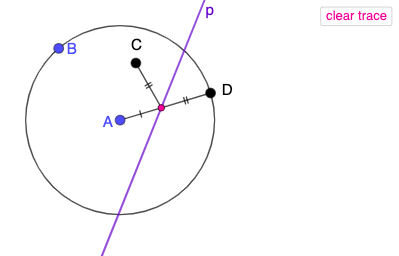
This GeoGebra example demonstrates the geometric definition and construction of conic sections by intersecting a plane with a cone, producing ellipse, hyperbola, and parabola. Key mathematical concepts include the geometric properties of conic sections, focus-directrix relationships, and the law of intersection between planes and conical surfaces. Construction details: Circle command creates the base circle, Point command defines the apex and key points on the cone, LineBisector constructs perpendicular relationships between foci and directrices, Ray command draws generatrices to represent the conical surface, Intersect command finds intersection curves between the plane and cone, Segment connects key geometric elements. This example is ideal for high school coordinate geometry courses, helping students intuitively understand the unified definition of conic sections (locus of points with constant ratio of distance to focus and directrix), and serves as an introductory demonstration for college-level analytic geometry.
GeoGebra Commands & Parameters
Circle(A, B) → cPoint(c) → DLineBisector(D, C) → pRay(A, D) → gIntersect(p, g) → HSegment(D, H) → hSegment(H, C) → iSegment(A, D) → fSegment(A, H) → jSegment(H, D) → kSegment(A, D) → lSegment(D, H) → mSegment(A, D) → nRay(A, D) → qPoint(q) → ERay(D, E) → r
AI Drawing Prompt Reference
Draw an ellipse formed by intersecting a plane with a cone. Include a cone apex, focus, and directrix, along with a ray representing the conical surface. The intersection of the plane and cone creates the ellipse, where points on the ellipse have a constant ratio of distance to the focus and directrix. Also include line segments connecting these key points to illustrate the geometric properties of the ellipse.
The prompt above was compiled from the original drawing commands and is for reference only.