
Mouhe Fangai: Constructing a Curved Solid from Conic Curves and Section Perimete
Loading the math board and drawing, please wait…
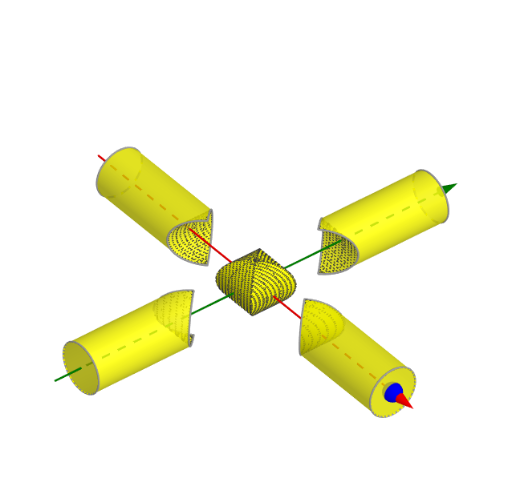
This example demonstrates how to build a “Mouhe Fangai” style 3D curved surface from carefully defined points and curves in the coordinate plane, and how related section lines can reveal geometric patterns such as perimeter behavior. The core math ideas include analytic geometry (conic sections represented with Cartesian-parameterized curves), solid geometry (surface construction from conic-/cylinder-related geometry), and geometric transformation/structural correspondence between planar and spatial objects. Construction highlights: GeoGebra Point is used to create key features (e.g., r, A, B, E, F, G); Ray and Circle define directional and circular constraints (objects such as C and parameters like a, b, c); CurveCartesian generates the main curve(s) (including f and D) in Cartesian form; Surface together with Cylinder produces the spatial curved surface/solid structure; Sequence is used to generate parameterized or discretized points for section/trajectory-like visualization. These commands and intermediate objects (Point, Ray, CurveCartesian, Surface, Sequence, Cylinder, Circle) together form the interactive 3D model. Suitable for secondary contest preparation and early university courses in analytic and solid geometry, especially for exploratory visualization of conics and derived surfaces.
GeoGebra Commands & Parameters
Point(xAxis) → DRay(C, D) → fPoint(f) → ACurveCartesian(B + (r * (abs(cos(t)), cos(t), sin(t))), t, 0, (2 * π)) → aCurveCartesian(A + (r * (0, cos(t), sin(t))), t, 0, (2 * π)) → bSurface(((1 - u) * a(v)) + (u * b(v)), u, 0, 1, v, 0, (2 * π)) → cSequence(Rotate[l1, (i * π / 2)], i, 0, 3) → l2Cylinder(A, F, r) → d, e, g, hCylinder(G, E, r) → i, k, p, jCurveCartesian((r * (cos(t), cos(t), sin(t))), t, ((-π)) / 2, π / 2) → lCurveCartesian((r * (cos(t), (-cos(t)), sin(t))), t, ((-π)) / 2, π / 2) → mSurface(((1 - u) * m(v)) + (u * l(v)), u, 0, 1, v, 0, (2 * π)) → nSurface(B + ((1 - u) * m(v)) + (u * l(v)), u, 0, 1, v, ((-π)) / 2, π / 2) → oSequence(Rotate[o, (i * π / 2)], i, 0, 3) → l5Circle(A, r, xAxis) → qSequence(Rotate[q, (i * π / 2)], i, 0, 3) → l6Sequence(Rotate[c, (i * π / 2)], i, 0, 3) → l3Sequence(Rotate[n, (i * π / 2), zAxis], i, 0, 1) → l4
AI Drawing Prompt Reference
Construct a 3D curved solid formed from parametrically defined conic-type curves. Using the given radius and coordinate axes, first define two main Cartesian-parameterized space curves using trigonometric coordinates. Interpolate between these two curve families with a blending parameter from 0 to 1 to generate one principal ruled surface patch, and create another related surface patch over an offset parameter interval. To reveal the spatial structure, rotate the resulting surface boundaries around the vertical (z) axis to produce a four-quadrant, ring-like symmetry. Add curved boundary references by drawing circles centered at a key point with the same radius and include additional rotated curve copies. Use cylinder-like volumes aligned with specified axis points/segments to shape and support the curved solid region.
The prompt above was compiled from the original drawing commands and is for reference only.