
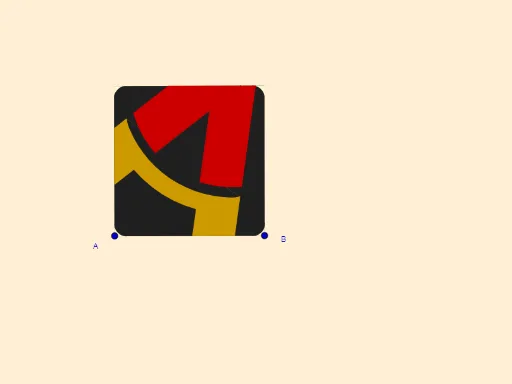
Geometric Construction of Aragón TV Logo
Loading the math board and drawing, please wait…
This example demonstrates the geometric construction of a complex 2D shape, particularly involving circles, vectors, and angles. Key math concepts include 2D vectors, angle calculations, circle properties, and geometric constructions. GeoGebra commands and objects used in the construction are Line, OrthogonalLine, Vector, OrthogonalVector, Midpoint, LineBisector, Mirror, Intersect, CircleArc, Polygon, and CircleSector. Suitable for high school and above students to understand geometric constructions and spatial relationships.
GeoGebra Commands & Parameters
Line(A, B) → sOrthogonalLine(A, s) → bVector(A, B) → uOrthogonalVector(u) → vOrthogonalLine(A_1, b) → rMidpoint(A_1, A) → JOrthogonalLine(Q_1, b) → m_2LineBisector(A, B) → mOrthogonalLine(J, m) → iOrthogonalLine(K, i) → lMirror(l, m) → l'Line(M, N) → qOrthogonalLine(B, u, xOyPlane) → gOrthogonalLine(F, l) → nIntersect(l, n) → QLine(P_1, g) → g_2Line(E, I) → jOrthogonalLine(L, i) → tIntersect(t, i) → OLine(D, b) → fIntersect(g_2, i) → SLine(S, j) → kOrthogonalLine(R, s) → j_4Intersect(j_4, i) → PLineBisector(P, O) → n_1OrthogonalLine(M_1, b) → m_1Line(H, q) → aLine(V, i) → dLine(W, d) → eIntersect(q, e) → ZIntersect(j, j_4) → TLineBisector(T, Z) → i_1Intersect(i_1, r) → F_1CircleArc(F_1, T, Z) → e_1OrthogonalLine(G, l) → pMirror(J, m) → J'Intersect(g, r) → CPolygon(A_1, C, B, A) → q1, a_1, c, b_1, a_2OrthogonalLine(V_1, s) → hLine(B_1, e) → f_1Intersect(e_1, a) → C_1,LineBisector(C_1, Z) → g_1Intersect(k, e_1) → U,LineBisector(T, U, xOyPlane) → h_1Intersect(k, r) → D_1Intersect(r, g_1) → E_1CircleArc(E_1, C_1, Z) → d_1Intersect(l, j) → G_1Intersect(q, m_2) → H_1LineBisector(G_1, H_1) → j_1Intersect(r, j_1) → I_1CircleArc(I_1, G_1, H_1) → k_1Intersect(a, d) → K_1Intersect(k, j_4) → J_1LineBisector(J_1, K_1, xOyPlane) → l_1Intersect(l_1, a_1) → L_1CircleArc(L_1, J_1, K_1, xOyPlane) → p_1Intersect(k, a) → N_1Polygon(T, E, D_1, U) → q2, q_1, t_1, h_2, i_2Intersect(a, r) → O_1Polygon(M, D_1, N_1, C_1, Z) → poly1, r_1, s_1, f_2, j_2, k_2CircleArc(E_1, T, U, xOyPlane) → c_1Intersect(b, k) → R_1Polygon(R_1, J_1, G_1, I) → q3, l_2, n_2, p_2, i_3Polygon(H, N, H_1, K_1) → q4, h_3, n_3, q_2, r_2Polygon(J_1, K_1, H_1, G_1) → q5, s_2, t_2, b_2, c_2Polygon(U, N_1, C_1) → t1, d_2, u_1, e_2Intersect(l, s) → S_1CircleSector(Q, F, S_1) → c_3Mirror(c_3, m) → d_3Mirror(d_3, i) → e_3Mirror(c_3, i) → f_3Polygon(F, Q, S_1, A) → q6, f_4, q_3, g_3, a_3Mirror(F, i) → F'Mirror(Q, i) → Q'Mirror(S_1, i) → T_1Mirror(A, i) → A'Polygon(F', Q', T_1, A') → q6', f', q', j_3, a'Mirror(F, m) → F'_1Mirror(Q, m) → Q'_1Mirror(S_1, m) → U_1Mirror(A, m) → A'_1Polygon(F'_1, Q'_1, U_1, A'_1) → q6'_1, f'_1, q'_1, k_3, a'_1Mirror(F'_1, i) → W_1Mirror(Q'_1, i) → Z_1Mirror(U_1, i) → A_2Mirror(A'_1, i) → B_2Polygon(W_1, Z_1, A_2, B_2) → q7, w_1, z_1, l_3, m_3Mirror(F', a') → F''Mirror(A', a') → A''
AI Drawing Prompt Reference
Draw a complex 2D shape involving multiple circles, vectors, and angles. Start by drawing a line segment and its perpendicular line. Then, create a vector from the line segment and find its orthogonal vector. Use these elements to construct various geometric objects like midpoints, angle bisectors, mirror reflections, and circular arcs. Finally, combine these objects into a polygon to showcase the intricate geometric construction and spatial relationships.
The prompt above was compiled from the original drawing commands and is for reference only.