
Dynamic Geometry Illustration by Tim Brzezinski (4)
Loading the math board and drawing, please wait…
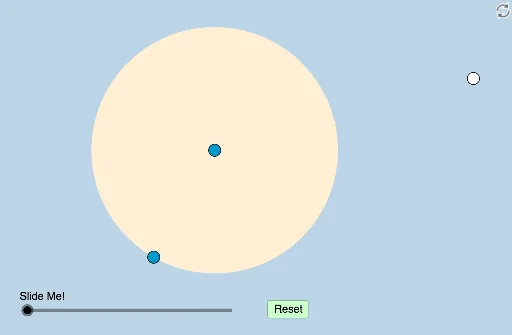
This example dynamically demonstrates the relationships and transformations among geometric figures like circles, rhombuses, and angles. It involves core mathematical concepts including circles, rhombuses, angles, transformations, and ratios. The construction utilizes commands and objects from GeoGebra such as Circle, Distance, PointIn, Semicircle, Intersect, Line, Angle, Dilate, Midpoint, Segment, Rotate, Vector, CircleArc, Point, Ray, CircleSector, and Translate. It is suitable for high school and above students to understand geometric transformations and the relationship with normal distribution in probability and statistics.
GeoGebra Commands & Parameters
Circle(A, B) → cDistance(A, B) → aPointIn(b) → C_1Semicircle(A, C_1) → dSemicircle(C_1, A) → eIntersect(c, d, 1) → D_1Intersect(c, e, 1) → CLine(C_1, C) → fLine(C_1, D_1) → gLine(C, g) → hIntersect(c, h) → F, DLine(C_1, D) → iIntersect(c, i, 2) → ELine(C, E) → jIntersect(g, j) → GAngle(A, D_1, G) → αAngle(C_1, C, A) → βDilate(C_1, If[0 < k ≤ 1, 1 - k, 0], G) → HMidpoint(C, C_1) → IDilate(C_1, If[0 < k ≤ 1, 1 - k, 0], I) → JSegment(C_1, J) → lSegment(C_1, H) → mDilate(G, If[0 < k ≤ 1, 1 - k, 0], G) → G'Dilate(A, If[1 < k ≤ 2, 2 - k, 0], D_1) → A'Dilate(A, If[1 < k ≤ 2, 2 - k, 0], C) → A'_1Segment(A, A') → nSegment(A, A'_1) → pDilate(G, If[1 < k ≤ 2, 2 - k, 0], D_1) → G'_1Dilate(I, If[1 < k ≤ 2, 2 - k, 0], C) → I'Segment(G, G'_1) → qSegment(I, I') → rRotate(A, 90°, C) → A'_2Angle(A, C, A'_2) → γCircle(C_1, (0.4 * Distance[C_1, G])) → tAngle(G, C_1, C) → δIntersect(t, m) → L,Rotate(L, If[4 < k ≤ 5, ((k - 4) * δ), δ], C_1) → L'Dilate(C_1, If[5.5 < k ≤ 6.5, 6.5 - k, 0], C) → MVector(C_1, M) → uDilate(E, If[7 < k ≤ 8, 8 - k, 0], C_1) → E'Segment(E, E') → h_1Dilate(C, If[8.5 < k ≤ 9.5, 9.5 - k, 0], E) → C'_1Dilate(E, If[9.5 < k ≤ 10.5, 10.5 - k, 0], G) → E'_1Rotate(C_1, If[11.5 < k ≤ 12.5, ((-(k - 11.5)) * π), (-π)], G) → NRotate(G, If[11.5 < k ≤ 12.5, ((-(k - 11.5)) * π), (-π)], G) → G'_2CircleArc(A, D_1, C) → e_1Point(e_1) → OLine(O, C_1) → n_1Line(D_1, n_1) → p_1Intersect(e_1, p_1) → P, QLine(O, Q) → f_1Midpoint(O, Q) → KCircle(O, (0.5 * Distance[O, K])) → sIntersect(s, n_1) → R, SIntersect(s, f_1, 1) → TAngle(R, O, T) → εLine(C, Q) → g_1Intersect(n_1, g_1) → UIntersect(c, n_1) → V, WDilate(O, If[4 < k ≤ 5, 5 - k, 0], U) → O'Segment(O, O') → q_1Dilate(U, If[5 < k ≤ 6, 6 - k, 0], W) → U'Segment(U, U') → r_1Ray(O, R) → s_1Dilate(W, If[6 < k ≤ 7, 7 - k, 0], C_1) → W'Segment(W, W') → t_1Circle(Q, 3) → c_1Intersect(c_1, p_1, 1) → ZRay(Q, Z) → a_1Dilate(D_1, If[7 < k ≤ 8, 8 - k, 0], Q) → A_1Segment(D_1, A_1) → b_1Rotate(R, If[8.5 < k ≤ 9.5, ((k - 8.5) * ε), ε], O) → R'CircleSector(O, R, R') → d_1Dilate(O, If[10 < k ≤ 11, 11 - k, 0], Q) → O'_1Vector(O, O'_1) → vTranslate(d_1, v) → c_2Dilate(C, If[11 < k ≤ 12, 12 - k, 0], U) → C'Segment(C, C') → i_1Dilate(U, If[12 < k ≤ 13, 13 - k, 0], Q) → U'_1Segment(U, U'_1) → j_1Angle(O, U, A) → ζDilate(A, If[13.5 < k ≤ 14.5, 14.5 - k, 0], U) → A'_3Segment(A, A'_3) → k_1Dilate(O, If[13.5 < k ≤ 14.5, 14.5 - k, 0], U) → O'_2Segment(O, O'_2) → l_1Rotate(O, If[15 < k ≤ 16, ((k - 15) * π), π], U) → O'_3Rotate(O'_2, If[15 < k ≤ 16, ((k - 15) * π), π], U) → B_1Segment(O'_3, B_1) → m_1Segment(O, O'_1) → f_2Circle(O, 1) → d_2Intersect(d_2, f_1, 1) → E_1Ray(O, E_1) → g_2
AI Drawing Prompt Reference
Draw a dynamic geometric illustration showing relationships and transformations among circles, rhombuses, and angles. Include two intersecting semicircles forming points, connecting them to create a rhombus and lines. Mark key angles and demonstrate how the rhombus transforms through dilation and rotation, relating to normal distribution.
The prompt above was compiled from the original drawing commands and is for reference only.