
Geometric Construction of a Spiral-Line Curve Using Arcs and Segments
Loading the math board and drawing, please wait…
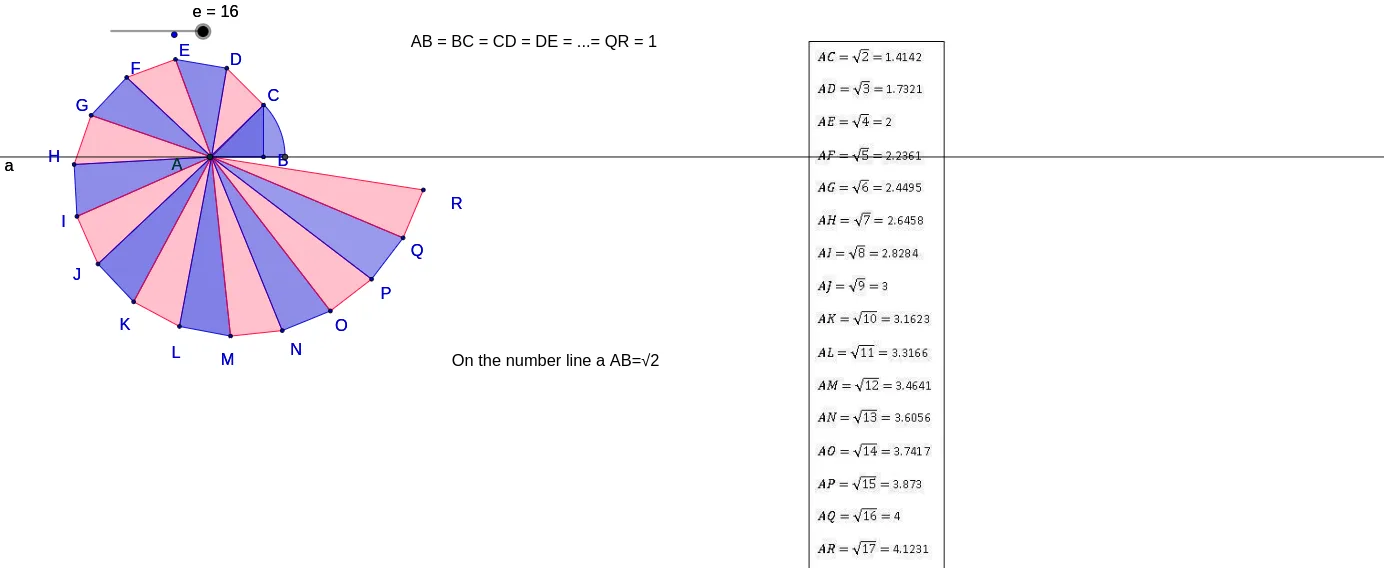
This GeoGebra example demonstrates how a spiral-line-like curve can be generated by connecting a sequence of circular arcs and line segments, letting the viewer perceive the evolving shape as the construction proceeds. It centers on core ideas from geometry and analysis intuition: circle and arc geometry, parameter/angle-driven constructions that naturally connect to trigonometric relationships (e.g., sine/cosine), and a limit/approximation viewpoint (the curve’s appearance stabilizes as more steps are added). Construction highlights from the provided summary: it uses GeoGebra tools Distance to measure key radii/lengths, Line to form connecting segments, Circle and Intersect to define circle positions and their intersections, CircleArc to draw the arc pieces, Point for the generated key points, and CircleSector to control or visualize sector-based construction. The objects include an ordered set of points (A, A_1, B, C…O), many intermediate poly* entities (poly1…poly16) that represent segment/arc pieces, along with measured distances (e.g., distanceAR, distanceAC) and parameters (b, c) and a text label (texte1). Suitable for secondary to early university learning, especially geometry construction activities, parametric/iterative modeling, and intuitive explorations of approximation and limits.
GeoGebra Commands & Parameters
Outil1(A_1, B) → poly1, COutil1(A_1, C) → poly2, DOutil1(A_1, D) → poly3, EOutil1(A_1, E) → poly4, FOutil1(A_1, F) → poly5, GOutil1(A_1, G) → poly6, HOutil1(A_1, H) → poly7, IOutil1(A_1, I) → poly8, JOutil1(A_1, J) → poly9, KOutil1(A_1, K) → poly10, LOutil1(A_1, L) → poly11, MOutil1(A_1, M) → poly12, NOutil1(A_1, N) → poly13, OOutil1(A_1, O) → poly14, POutil1(A_1, P) → poly15, QOutil1(A_1, Q) → poly16, RDistance(A_1, R) → distanceARDistance(A_1, C) → distanceACLine(A_1, B) → aCircle(A_1, 1.4142135623730951) → fIntersect(f, a) → S, TCircleArc(A_1, C, T) → gPoint(a) → ACircleSector(A, T, C) → h
AI Drawing Prompt Reference
Draw a spiral-like curve composed of a sequence of arcs and line segments. Start from point A_1 and draw multiple line segments to the right, forming a series of arcs with gradually decreasing radii. Then, measure the distances from A_1 to R (distanceAR) and from A_1 to C (distanceAC). Draw a line a from A_1 to B, and a circle f with A_1 as the center and a radius of 1.4142135623730951. The circle f intersects line a at points S and T. Draw an arc g starting from C and ending at T, and a sector h with A as the center, starting at T and ending at C.
The prompt above was compiled from the original drawing commands and is for reference only.