
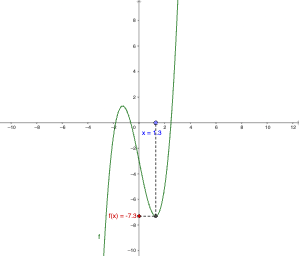
Geometric construction illustrating x and f(x)
Loading the math board and drawing, please wait…
This example demonstrates the relationship between the input variable x and the function value f(x) by using an interactive geometric setup that visually pairs each x-position with its corresponding f(x) value. The key mathematical ideas are functions (Function) and their graphing/graphical representation, emphasizing point correspondence and the construction of connecting segments that encode the mapping from x to f(x). In GeoGebra, the construction is built using the commands Point and Segment to create and link essential objects (notably A, B, P and the function object f), along with auxiliary parameters or endpoints a and b and supporting constructions g and h. Text elements (text1, text2) are used to annotate what each element represents. Suitable for middle school through early undergraduate use, especially for introducing function concepts, interpreting function graphs, and practicing geometry-based visualization.
GeoGebra Commands & Parameters
Point(xAxis) → ASegment(B, P) → gSegment(P, A) → h
AI Drawing Prompt Reference
Draw an x-axis and place a point A on it. Then, draw a segment from a point B on the x-axis to point P, and draw another segment from point P back to point A. This construction visually pairs each x-value with its corresponding f(x) value, illustrating the relationship between x and f(x).
The prompt above was compiled from the original drawing commands and is for reference only.