
Geometric Construction for a Four-Color Game
Loading the math board and drawing, please wait…
In collections
GeoGebra and Laser Cutting
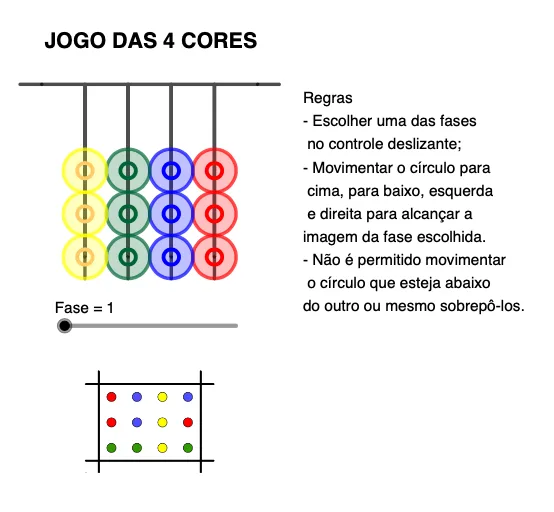
This example demonstrates a four-color game setting using a carefully constructed geometric layout, where colored regions/choices are supported by repeatable constructions based on key points and connecting segments. It centers on 2D geometric construction concepts: points and segments, the midpoint of a segment, and the role of circles as geometric constraints, together with polyline-based wiring to organize the figure for logical selection rules. Construction-wise, the GeoGebra commands highlighted are PolyLine (multi-segment paths), Midpoint (segment midpoints), Segment (straight connections), Point (defining vertices/anchors), and Circle (circular constraints). The model includes many named point objects (e.g., A_3, B_3, C_1, D_1, …) and circle/auxiliary geometric elements (e.g., f, i, j, l, O_1, etc.), which together generate the drawable structure used for the four-color interaction. Suitable for middle/high school geometry lessons, logic-and-visual reasoning activities, and classroom demonstrations on geometric construction skills.
GeoGebra Commands & Parameters
PolyLine(A_3, B_3, K_2, L_2, M, N, O, P, Q, R, S, T, C_1, U, V, W, Z, A_1, B_1, D_1, E_1, F_3, G_1, H_1, I_1, J_2) → fMidpoint(O_1, P_1) → Q_1Segment(Q_1, P_1) → iMidpoint(R_1, S_1) → T_1Segment(T_1, R_1) → jMidpoint(U_1, V_1) → W_1Segment(U_1, W_1) → lMidpoint(Z_1, A_2) → B_2Segment(Z_1, B_2) → mMidpoint(C_2, D_2) → E_2Midpoint(F_2, G_2) → H_2Segment(F_2, H_2) → nSegment(C_2, E_2) → aPoint(f) → JCircle(J, 0.5) → cPoint(f) → KCircle(K, 0.5) → dPoint(f) → LCircle(L, 0.5) → ePoint(f) → GCircle(G, 0.5) → gPoint(f) → HCircle(H, 0.5) → hPoint(f) → ICircle(I, 0.5) → kPoint(f) → FCircle(F, 0.5) → pPoint(f) → ECircle(E, 0.5) → qPoint(f) → DCircle(D, 0.5) → rPoint(f) → ACircle(A, 0.5) → sPoint(f) → BCircle(B, 0.5) → tPoint(f) → CCircle(C, 0.5) → c_1
AI Drawing Prompt Reference
Create a 2D geometric construction featuring a long polyline “wiring” layout that runs through a sequence of pre-defined key points, forming the main backbone of the figure. Next, select several segment endpoint pairs inside the layout, mark the midpoint of each segment, and draw straight auxiliary segments connecting each midpoint to its corresponding endpoint. Then use a construction baseline point derived from the polyline to serve as a center, and place multiple circles of the same given radius around successive points located on that baseline. For each circle, add the relevant point on its circumference to act as an anchor, producing a chain of circular constraints integrated with the polyline and midpoint-based connectors.
The prompt above was compiled from the original drawing commands and is for reference only.