
Geogebra Geometry Construction Example: Rhombus and Transformations
Loading the math board and drawing, please wait…
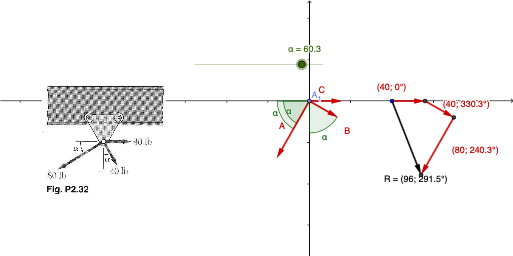
This example demonstrates the geometric properties of a rhombus and vector transformations using GeoGebra. It involves core concepts like symmetry, angle measurement, vector translation, and geometric construction. Key GeoGebra commands and objects used include Angle, Point, Translate, and Vector for creating points, measuring angles, translating vectors, and generating transformed shapes. Suitable for high school mathematics education to understand geometric transformations and vector applications.
GeoGebra Commands & Parameters
Angle(Vector[(-UnitVector[xAxis])], A) → γPoint(xAxis) → B_1Translate(B_1, C) → B'Vector(B_1, B') → uTranslate(B', B) → B''Vector(B', B'') → vTranslate(B'', A) → B'''Vector(B'', B''') → wVector(B_1, B''') → zPoint(yAxis) → A_1Point(yAxis) → ETranslate(A_1, B) → A'Angle(Line[A_1, E], Line[A_1, A']) → βPoint(xAxis) → GPoint(A) → HAngle(G, A_1, H) → δ
AI Drawing Prompt Reference
Draw a rhombus and perform translation transformations around it. Start by taking a point B1 on the x-axis, then translate B1 by vector C to get B', and generate vector u. Next, translate B' to get B'', generate vector v, then translate B'' to get B''', and generate vector w. Take points A1 and E on the y-axis, translate A1 by vector B to get A', and measure the angle β formed by A1, E, and A'. On the x-axis, take point G, and at point A, take point H, and measure the angle δ formed by G, A1, and H.
The prompt above was compiled from the original drawing commands and is for reference only.